


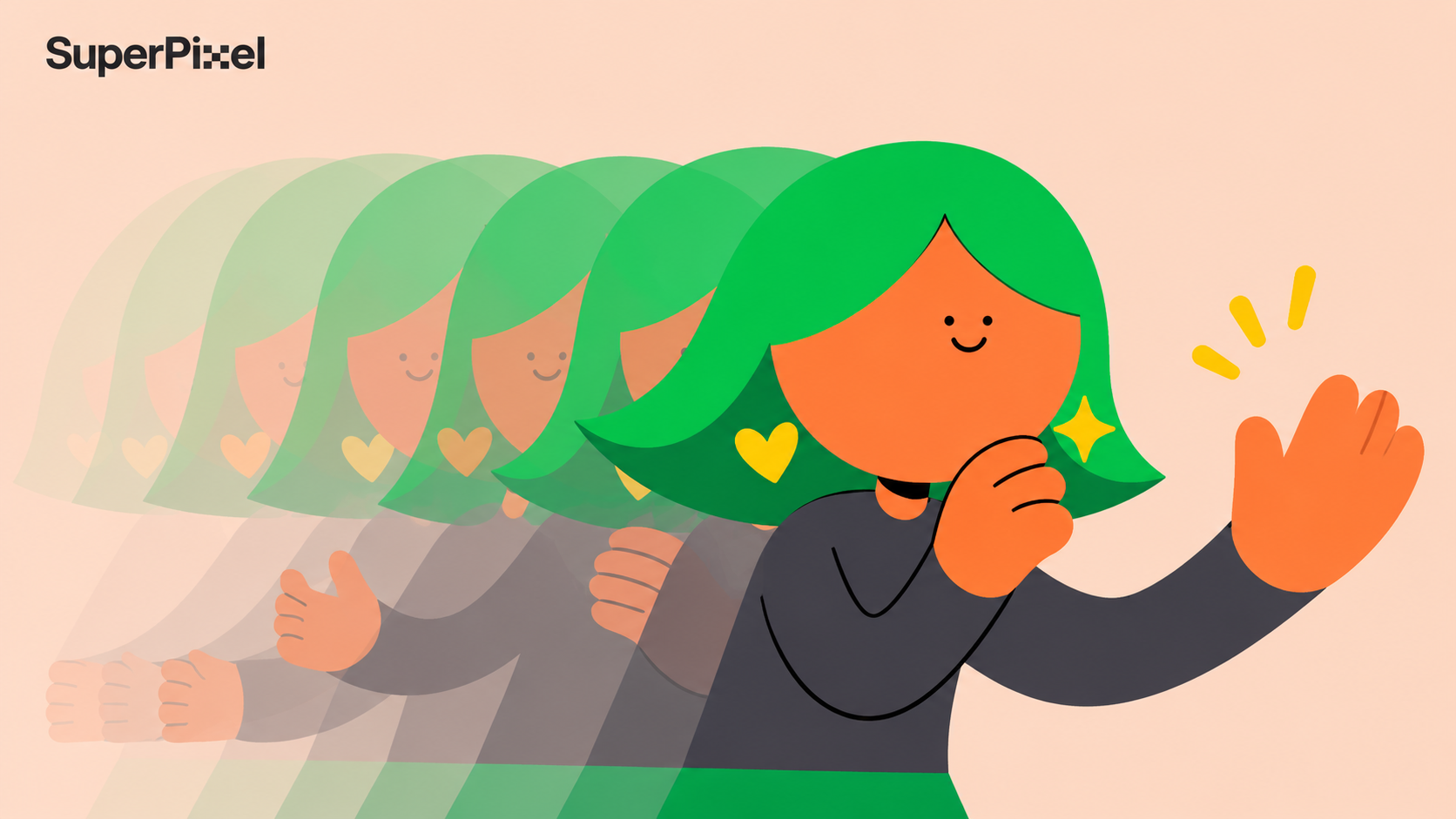
Tweening, short for inbetweening, is the process of creating intermediate frames between keyframes to produce continuous movement in animation. In traditional animation, artists draw these frames by hand.
Digital animation software can calculate certain transitions automatically, making it easier to animate changes in position, shape, scale, and other properties.
However, good tweening involves more than filling the gaps between two poses. The timing of a movement, the distance between frames, and the way an object accelerates or slows down all affect how the animation feels. Understanding these decisions helps explain why some movements look convincing while others feel mechanical.
This guide explains how tweening works, its main techniques, and what makes it effective in real animation production.

What Is Tweening in Animation?
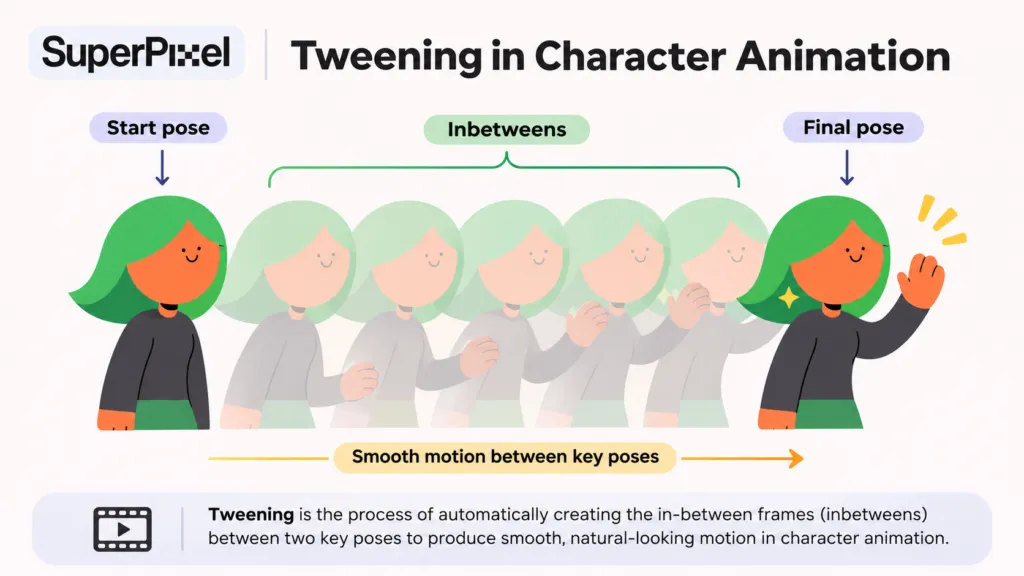
Tweening is the technique of creating intermediate frames, known as inbetweens, between important poses or keyframes. These additional frames connect separate drawings or states, allowing the audience to perceive a continuous movement rather than a sudden change.
Imagine an animated character raising an arm to wave. The first keyframe establishes the arm at rest, while another keyframe shows it raised. The inbetweens define how the arm moves between those positions, including its direction, speed, and changes in posture.
In traditional 2D animation, artists draw these intermediate poses. In digital animation, software can interpolate certain properties between keyframes, although more complex character movements may still require manual adjustments.
If you are interested in traditional animation techniques, working with an experienced studio can bring your vision to life with fluid, hand-crafted motion.
How Does Tweening Work?
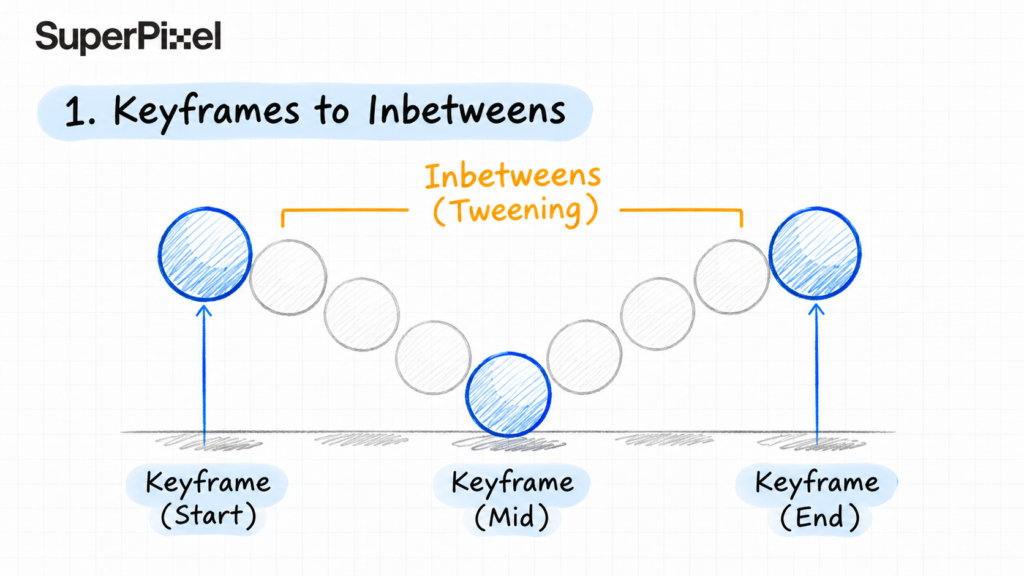
Tweening typically begins with keyframes that establish the important moments of an action. Animators then work out how the subject should move between these poses before completing the intermediate frames.
Three elements are particularly important:
- Keyframes: Establish the main poses or property values that define an action.
- Breakdowns: Describe how a movement transitions between key poses, including its path and important intermediate positions.
- Inbetweens: Fill the remaining gaps to create the intended progression of movement.
For example, when animating a bouncing ball, the key poses might show the ball at its highest point, touching the ground, and rising again. Breakdown poses and inbetweens help communicate the ball’s changing position, squash and stretch, and acceleration.
The process also depends on how the animation is timed. As Animation Mentor explains in its discussion of animation timing, the duration of a pose and the speed of a transition can change how an audience perceives weight, energy, and character performance.
Why Is Tweening Important?
Tweening helps connect individual poses into readable movement, but producing smooth transitions is only one part of its role. The arrangement of intermediate frames can communicate weight, speed, intention, and changes in emotion.
Consider two characters performing the same action: turning their heads toward a sound. One might react immediately, while another pauses before turning slowly. The key poses could be similar, but the timing and spacing between them create different performances.
This is particularly important in character animation, where a movement needs to communicate more than a change in position. An audience should be able to understand what a character is doing and, where relevant, what the character is feeling.
Well-planned tweening also makes production more manageable. Once the important poses and timing are established, animators can develop the intermediate motion without repeatedly redesigning the entire action.
Types of Tweening in Digital Animation
Digital animation tools can interpolate different visual properties, depending on the software and animation method. Understanding the main tweening types helps animators choose an appropriate technique.
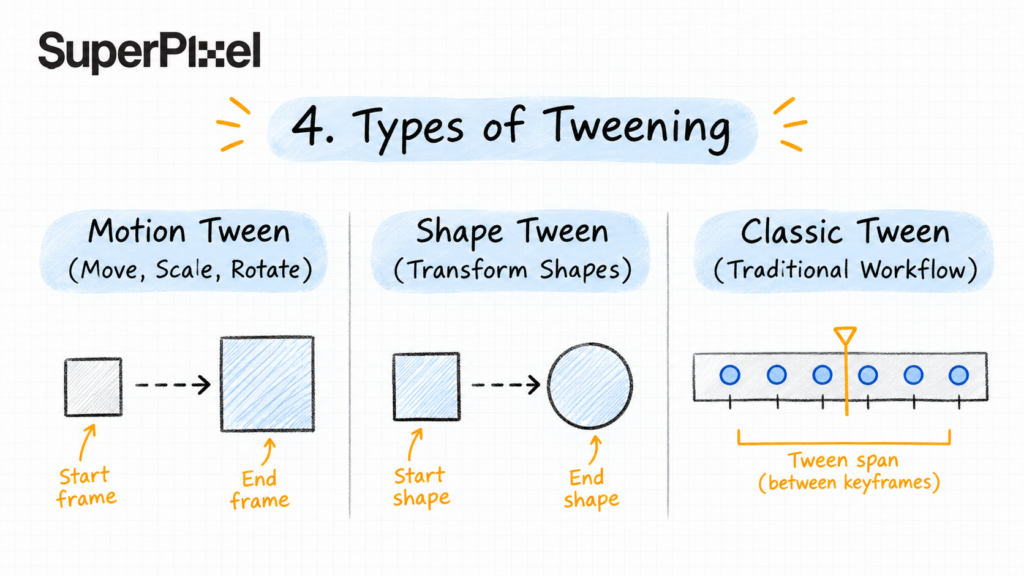
Motion Tween
Motion tweening creates intermediate changes in an object’s properties, such as position, rotation, scale, or opacity. An animator defines values at different points in a timeline, and the software calculates the values between them.
For example, a graphic element might move from the left side of a screen to the centre while gradually increasing in size. Motion tweening can generate the intermediate positions, while the animator controls the path and timing.
Classic Tween
Classic tweening is an older tweening method supported by Adobe Animate. It also creates transitions between keyframes but uses a different workflow and offers certain features associated with earlier versions of the software.
According to Adobe’s documentation on tween types, Classic Tween remains available primarily for compatibility and particular animation requirements. It should not be confused with traditional hand-drawn inbetweening.
Shape Tween
Shape tweening interpolates changes between vector shapes. For example, a square can gradually transform into a circle, with the software generating the intermediate shapes.
This can be useful for animated icons, abstract transitions, and certain motion graphics sequences. However, complex shape changes may need additional guidance to prevent unexpected distortions.
These techniques illustrate how software can automate part of the tweening process, but the animator remains responsible for evaluating the final movement.
Timing, Spacing, and Easing: Why They Matter
Two animations can contain the same start and end poses but feel completely different. Much of that difference comes from how the intermediate frames are arranged.
- Timing determines how long an action takes and when significant poses occur. A fast movement can suggest urgency or lightness, while a slower movement may communicate weight, hesitation, or emphasis.
- Spacing describes the distance an object travels between successive frames. Even spacing creates constant-speed movement, while changing the spacing produces acceleration or deceleration.
- Easing controls how movement speeds up or slows down, often near the beginning or end of an action. In digital animation, easing curves help adjust the distribution of movement between keyframes.
These decisions are an important part of animation design because timing and movement affect how audiences interpret what they see.
As explained in Animation Mentor’s guide to slow in and slow out, meaningful changes in spacing are essential to how motion communicates acceleration. Simply adding smoother curves does not automatically create a convincing performance.
For instance, an animated logo moving into place might gradually slow before stopping to create a controlled arrival. A character reacting to a sudden surprise, however, may need a sharp movement with very little easing. Applying the same motion curve to both would ignore their different purposes.
Traditional vs Digital Tweening
Traditional and digital tweening share the same underlying objective: connecting important poses through intermediate movement. The main differences lie in how those frames are produced and adjusted.
Traditional Hand-Drawn Tweening
In traditional animation, key animators establish the important drawings and breakdowns, while inbetweeners may create the remaining drawings according to the production workflow.
Timing charts can help communicate where intermediate drawings should be placed and how an action accelerates or slows down.
Animators may also work on ones or on twos. At a playback rate of 24 frames per second, animating on ones generally means using a new drawing for each displayed frame, while animating on twos means holding each drawing for two frames. The choice affects visual rhythm and the amount of drawing required.
Other animation styles may deliberately use fewer drawings or held poses to create a particular visual rhythm.
Digital Tweening
In digital animation, software can calculate intermediate property values and allow animators to adjust the results through keyframes, motion paths, and animation curves.
This makes certain repetitive changes easier to manage, particularly in 2D animation production and motion graphics involving multiple animated elements.
However, different animation styles require different approaches. Complex character performances may combine automated interpolation with manual posing, while some stylised sequences benefit from deliberately limited movement or held frames.
In 3D animation, interpolation can also be used to control changes in position, rotation, camera movement, and other properties.
The broader differences between 2D and 3D animation affect what is being interpolated and how animators review the movement.
The right method depends on the creative requirements rather than whether the animation is produced traditionally or digitally.
What Makes Tweening Work Well in Actual Animation Production?
Good tweening is not defined by how many intermediate frames an animator creates. It depends on whether those frames produce the intended movement, maintain the visual structure of the subject, and support what the audience needs to understand.
Four production considerations are especially important.
1. Establish Clear Key Poses Before Adding Movement
Intermediate frames cannot fully compensate for key poses that fail to communicate an action. If a character’s silhouette, expression, or body position is unclear, adding more inbetweens may simply produce a smoother version of an unreadable movement.
This is why pose-to-pose animation begins by establishing the important moments of an action. The animator can evaluate whether the movement makes sense before investing time in detailed transitions.
The same principle applies during an animation storyboard, where important actions and visual beats can be reviewed before detailed animation begins.
In commercial animation, this also helps teams review major creative decisions earlier, when changes are generally easier to make.
2. Adjust Timing to Fit the Action
Not every movement should have the same rhythm. A heavy object may need a slower acceleration, while a lively character might move quickly between expressive poses.
Timing also determines how long an important pose remains visible. If a character’s reaction disappears too quickly, viewers may miss its intended meaning even when the animation is technically smooth.
This is one of the practical lessons demonstrated in Animation Mentor’s tutorial on timing and spacing, which shows how changing frame durations and movement spacing can affect the impact and readability of animated actions.
3. Check the Motion, Not Just the Animation Curves
Automatic interpolation can generate smooth transitions, but smoothness alone does not guarantee convincing motion.
An arm may follow an awkward path, a character’s weight may shift inconsistently, or a graphic element may move too slowly for the intended visual rhythm. These problems need to be judged by watching the animation rather than relying entirely on software settings.
For character movements, animators may adjust breakdown poses, spacing, arcs, or individual frames. For motion graphics, they may refine easing and timing to make transitions feel more deliberate.
The goal is not always perfectly fluid motion. It is motion that suits the style and purpose of the scene.
That relationship between movement and meaning is also part of visual communication: animation should guide attention rather than simply make elements move.
4. Review Movement in the Context of the Final Sequence
An animation that looks convincing in isolation may behave differently when combined with dialogue, music, editing, or other visual elements.
For example, a transition between two graphic elements might look smooth during a motion test but take too long once the full sequence is assembled. Similarly, a character’s gesture may need additional time so the audience can register an important expression.
These decisions are part of visual storytelling, where movement needs to support the progression of the overall sequence.
They are particularly important in an explainer video, where animated diagrams, characters, text, and transitions all need enough time to communicate their message clearly.
These are production decisions that cannot be resolved by automatic tweening alone. Animators need to review how individual actions contribute to the timing, clarity, and overall direction of the finished piece.
Tweening Examples in Animation and Motion Graphics
Tweening appears in many forms of animation, although its application varies by technique and visual style.
- Character animation: Intermediate poses connect gestures, expressions, and body movements. Timing and spacing help establish how a character reacts, moves, or interacts with other elements.
- Motion graphics: Keyframed transitions can animate text, icons, logos, and graphical shapes. Adjusting their timing helps guide attention and establish a clear visual sequence.
- Explainer videos: Animated diagrams, objects, and characters can use tweened movement to show how a process develops over time. Clear transitions make changes easier to follow without overwhelming the viewer.
Across these applications, the important consideration is not whether tweening is available, but how the movement contributes to the communication goal.
Frequently Asked Questions About Tweening
What is the difference between keyframing and tweening?
Keyframing establishes important poses or property values at specific points in an animation. Tweening creates or calculates the intermediate changes between those keyframes. The two processes work together to build continuous movement.
Is tweening the same as easing?
No. Tweening creates or calculates the intermediate movement between keyframes, while easing controls how that movement accelerates or decelerates. Easing is one technique used to refine tweened motion.
Is tweening only used in 2D animation?
No. Tweening and interpolation are also used in 3D animation and motion graphics. The properties and workflows differ, but the principle of defining important states and calculating or creating intermediate changes remains relevant.
Does automatic tweening replace traditional animators?
Automatic tweening can reduce repetitive work, but it cannot independently determine whether a movement communicates the intended emotion, weight, or visual emphasis. Animators still make decisions about posing, timing, spacing, and the suitability of the final result.
Those qualities are often what distinguish strong work in an animation showreel, regardless of how much of the intermediate movement was generated automatically.
Making Tweening Work for the Story
Tweening is an essential part of animation, but its value goes beyond connecting one frame to another. The quality of the movement depends on the poses selected, the timing between them, and the decisions made when reviewing the animation as a whole.
At SuperPixel, our animation services cover character animation,2D animation, and motion graphics for brands and organisations. Each project calls for different visual and production decisions, from how a character performs to how motion supports the message.
If you’re planning an animated campaign, explainer, or character-led video, get in touch with our team to discuss the approach that fits your project.