


Whether it’s an animation film, television show, movie, or commercial, storyboarding serves as an essential foundation for the success of your project. It provides a sneak peek of the outcome before bringing everything to life. An animation storyboard is a visual guideline of your animation, outlining characters, settings, actions, and character dialogue that will breathe life into your story.
Mastering the art of storyboarding is fundamental to the creative journey as a solid storyboard streamlines the complex animation process and maintains organisation simply by understanding how to craft an animation storyboard template. This allows a smooth and established workflow for both the production team and clients.
This comprehensive guide covers all aspects of animation storyboarding, from essential elements to animation software, such as Adobe Photoshop, highlighting its significance in the storytelling process.
Key takeaways:
- Storyboards can be traditional hand-drawn sketches or digital creations using software like Storyboard Pro. Each type offers unique benefits depending on the client and production’s needs.
- The animation storyboard gives visual direction and pace to the production crew. It helps save time and resources when issues are identified in the earlier stage.
- Storyboard animators should focus on highlighting key moments, working closely with the production crew and client, and continuously refining their drawing and storytelling skills to showcase the emotions and persona of the characters.

What’s a Storyboard in Animation?
A finished storyboard is a sequence of images that captures the main elements of each scene, offering animators, the production staff and clients a visual of the final animation.
In the pre-production process, the storyboard artists create rough sketches after the storyline, visual references, animation styles, character designs, and full script are written. The animated storyboard outlines the key scene of an animation show or film that should be executed and what it should look like when it’s finished.
Storyboards are labelled with scene numbers and dialogue notes to show the important parts of the scene. Action notes are added to describe what characters do and how scenes are supposed to look, while camera notes explain their movements and angles. Other important details are also included to keep everything clear and connected during the production phase.

The Importance of Storyboarding
An animation storyboard provides a clear visual guide for each scene, outlining how it should appear. Without a storyboard, the production crew would need to rely solely on written scripts, which are more complex, open to multiple interpretations and would lack the clear guidance provided by visual references.
Here are the main reasons to use an animation storyboard:
Visualisation:
Helps in visualising the animated film or animation projects before the actual production begins. This allows the creative team to imagine and plan the sequence of events and shots before the actual production begins. Polishing story flow and any necessary adjustments could be done to improve the overall quality of the final product.
Organisation:
Storyboarding arranges the sequence of scenes, providing a structured layout of the events that will unfold. This enables thorough planning throughout the pre-production, production, and post-production phases, ensuring a seamless flow in the final animation.

Communication:
Animation storyboards are an essential tool for communication between the director, animators and the production crew, ensuring everyone is on the same page. Moreover, it assures that clients or non-creative individuals understand the project’s direction before production begins.
Efficiency:
Storyboarding aligns the whole process, saving time and resources by providing a clear guideline. A clear direction from start to finish helps to prevent misunderstandings, reduces the need for revisions, and minimizes wasted time and resources. This ensures that the production stays on track, from meeting deadlines to staying within budget.
Problem-Solving:
Identification and resolution of potential issues in the early stage could be done with an animation storyboard. By mapping out the sequence of scenes, animators and the production crew can expect and solve any creative or technical challenges as well as address the client’s feedback before starting the production process.
Creativity:
The storyboarding stage provides a platform for exploring creative ideas and experimenting with different camera angles, visual effects, and character movements to showcase their maximum potential. During this creative process, the storyboard artist can explore various approaches and techniques to elevate the quality and impact of the final product, ultimately enhancing the viewing experience for the targeted audience.

Reference:
Storyboards act as a reference throughout the production process, guiding animators in creating each scene with a clear direction. By referring to the board, artists can maintain consistency in the overall storytelling, from visual style to character movement. This guideline also helps animators to accurately portray the client’s and director’s vision onto the screen.
These key points highlight the crucial role of storyboarding in the animation process, emphasising its significance as a powerful tool for creating successful animation films or projects.
Storyboard template components
The following are some of the components that make up the storyboard templates
1. Title
The title component contains the title, scene, episode, and page. This first component is very important because it is the basic concept that becomes the understanding of the audience to know the topic that is presented in a video.
2. Subtitle
The subtitle as the second component contains an explanation of each scene, location, time, sequence, and panel design. The subtitle serves to make it easier to explain the topic of the title so that the audience can find out each scene in more detail and more easily.
3. Visualize
The visual component contains a description of each scene that contains elements such as images, text, photos, graphics, and other elements. These elements are screen complements in the video.
4. Audio
The fourth component is audio. The audio contains a description of the audio used in the video such as the name of the music file or recording and the sound effect (SFX) to be played.
5. Dialog
The dialogue contains details of camera movement along with the angle and some dialogue on the scene being taken. It is optional and adapts to the storyboard design.
6. Property
The properties component provides an explanation of the artistic, duration and timing, additional equipment, and design support properties.
Key elements of storyboard template
Some basic elements that have to be in a storyboarding:
1. Panel
Panels are simple boxes that display 2D images containing actions and characters. The pictures in this panel are referred to as shot pictures.
2. Shot number
The shot number indicates the order in which the shots should appear according to the video list. Knowing the main types of camera shots makes this step much easier.
3. Action
Action is the main activity that occurs in the shot.
4. FX
Technical details explain shot-making in the production and post-production stages such as aspect ratio, camera angle, camera movement, type of shot, sound effects, and special effects.
5. Description
The description panel contains a record of the sequence of events. This panel description will inform technicians and other cinematographers about the images they see on the storyboard.
6. Arrangement
This element determines how the frames and notes are arranged in the storyboard.
7. Sequential
The frames are arranged sequentially with the frame and description panel on the same page. In the sequential arrangement, you can view storyboard frames one by one.
8. Comic
The frame is set to be read from left to right like a book. This design offers movement and energy to the story being read.
9. Flowchart
The frames are arranged in a flowchart, where scenes are drawn in parallel and sequential scenes are drawn linearly.
The function of a storyboard
Storyboards have a pretty big role in creating movies and videos. The storyboard describes the storyline from beginning to end. The storyboard also plans the process of shots taking to be more structured.
In addition, the storyboard also serves as a guide for the entire production stage from pre-production to post-production so that the production process can run more easily and the results are as expected. Storyboarding is also a good medium for testing ideas such as camera angles. Storyboards can strengthen the vision and help communicate the vision effectively.
Then, storyboards can function as an effective communication tool in conveying ideas to others, explaining the process of changing, moving each frame or element, and playing a role in setting the timing or timing of each sequence, inviting feedback, and working on them before production.
Storyboards can make communication easier because it will be easier to convey your ideas to other teammates when you have detailed notes on easy-to-understand concepts. The shortcomings seen in the storyboard will help the evaluation process so that teammates can provide additional ideas or correct your ideas in scenes.
Filmmaking becomes more effective with storyboards because you already have a reference in creating videos so you can prepare what you need in creating the film, especially screen needs such as lighting, camera locating, angles, and so on.
The complete content of the storyboard will ensure you don’t miss any important details and understand what is needed for each scene. That way you will get the best final result.
Types of Storyboards
Understanding the different types of storyboards helps to choose the right format for each project. Each type offers unique benefits, such as clear visuals, effective communication, and efficient workflow.
Mastering storyboard types empowers artists to create compelling visual narratives, optimize their creative processes and meet diverse expectations.
Traditional Storyboards:
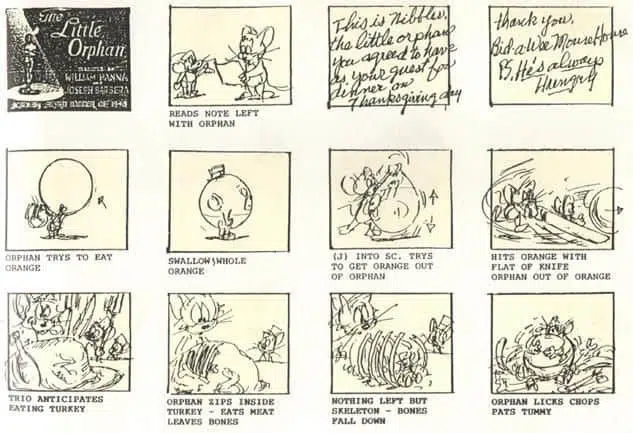
They consist of still images and are usually hand-drawn on paper with written explanations of what is going on in each scene. The details in traditional storyboards can differ but they can still act as a guide for the animation team.
While some require basic artistic skills, others require a rough overview to portray the visual flow and key information.
Here’s an animation storyboard example from the animated TV series, Tom & Jerry:
Thumbnail Storyboards:
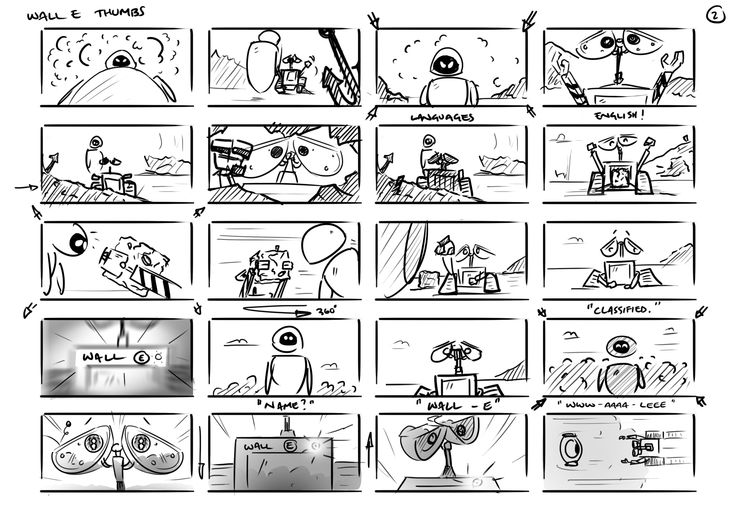
These rough sketches are used to outline the arrangement and flow of a scene. A thumbnail storyboard is typically used by a small team or even an individual who already has a clear vision of how they wish to visually portray their idea. Due to the small size, they are less detailed which takes a shorter time than traditional storyboards.
Check out this thumbnail storyboard example from the animated film, Wall-E:
Digital Storyboards:
Digital storyboards are a modern approach to traditional storyboards. Instead of using the hand-drawn method, this technique uses software that is designated for this purpose. This approach allows easier amendments and editing allowing quick changes and revisions. Digital storyboard includes movement, timing, and audio elements to give a more dynamic preview of the finished product.
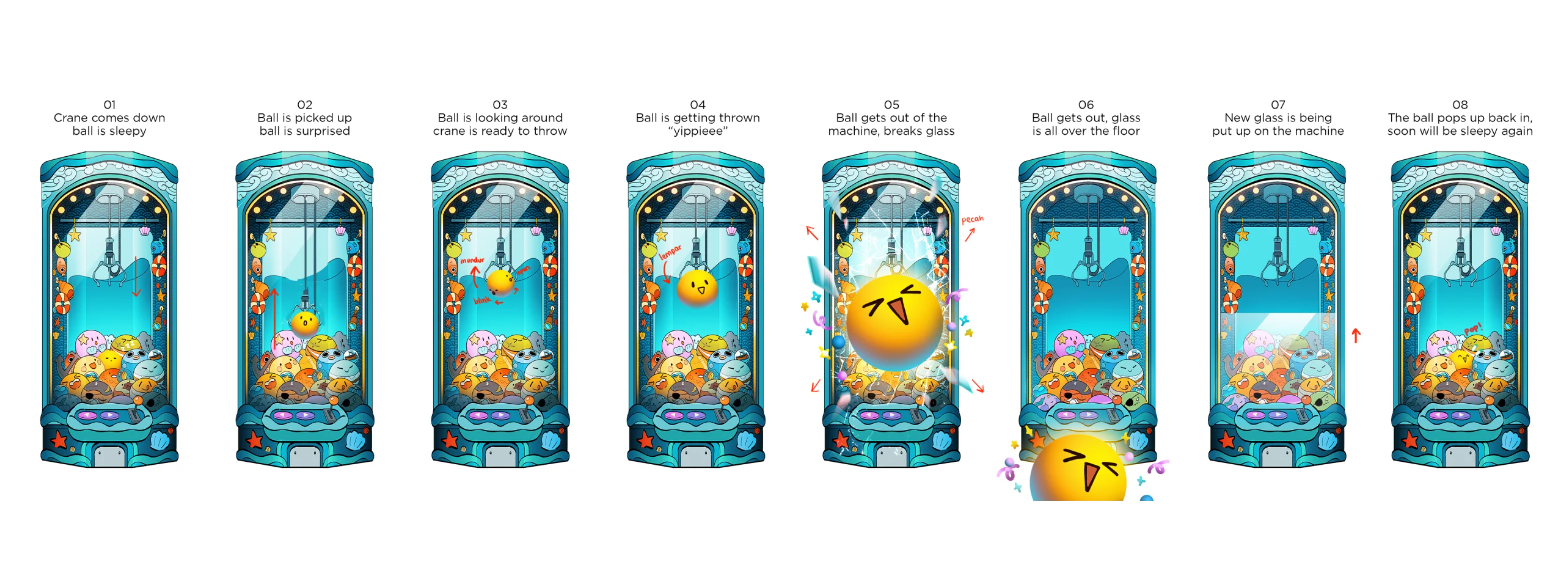
Every kind of storyboard offers its benefits and is selected depending on factors like the complexity of the animation project, the preferences of the storyboard artist, and the target audience for the storyboard. Live-action projects follow a similar approach, as our guide to the video storyboard for live action explains.
Well-known Animation Storyboard Examples
Need more ideas? Check out these great animation storyboard examples made for famous animated series and movies.
UP
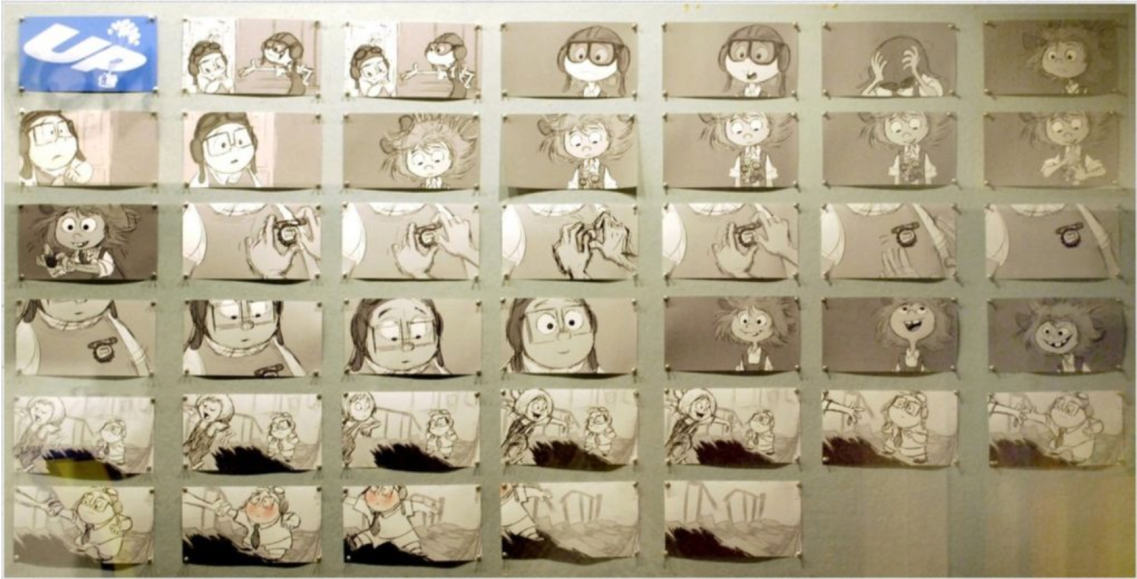
Up is a heartwarming animated film about an old guy named Carl Fredricksen who embarks on an adventure to fulfil his lifelong dream of visiting South America’s Paradise Falls. In this storyboard, the artist captures Carl’s emotions as Ellie pins a badge on him through the drawing.
Adventure Time
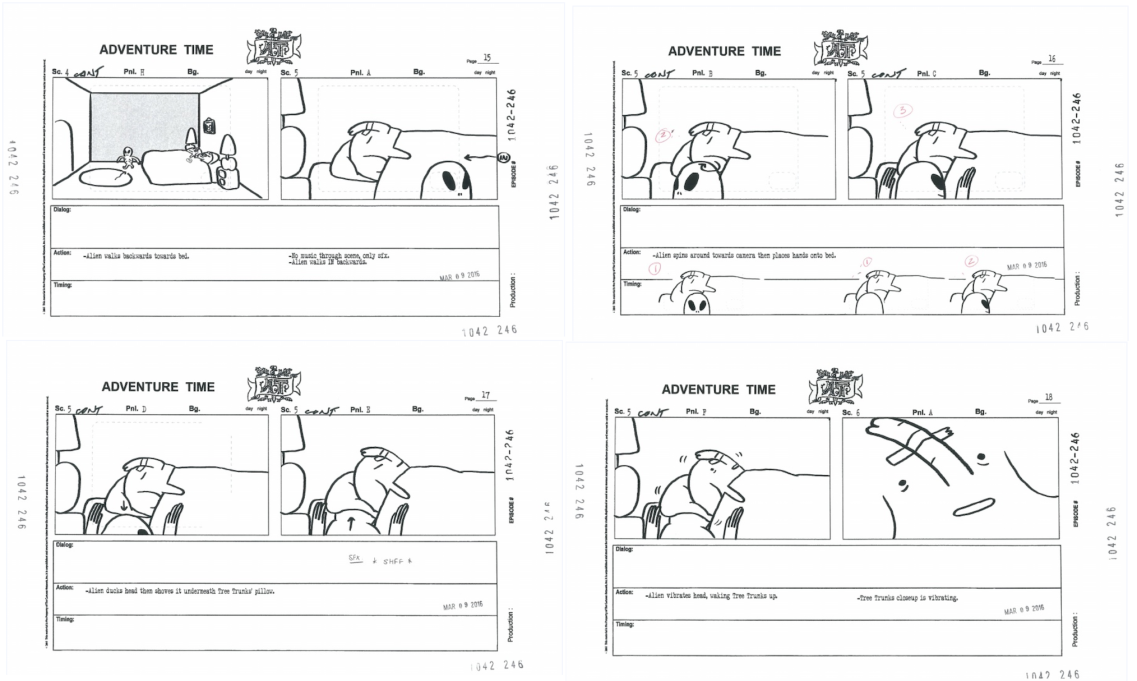
Adventure Time is an animated series about Finn and Jake exploring the Land of Ooo. The storyboard shows how the quirky characters are on an adventure for exciting quests. With lively and colourful drawings, it showcases the playful and imaginative side of the show.
Transformers
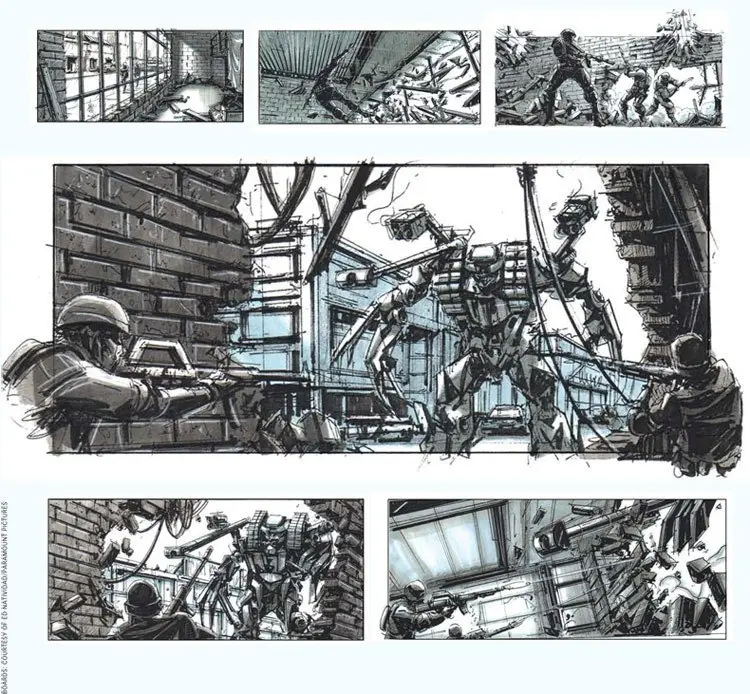
The thrilling and packed action series, Transformers, is about robotic cars in epic battles. This detailed animation storyboard precisely captures how the action scenes should take place and how the crew can capture it effectively while paying attention to small details such as shattering glass, to enhance the overall experience.
Batman: The Animated Series
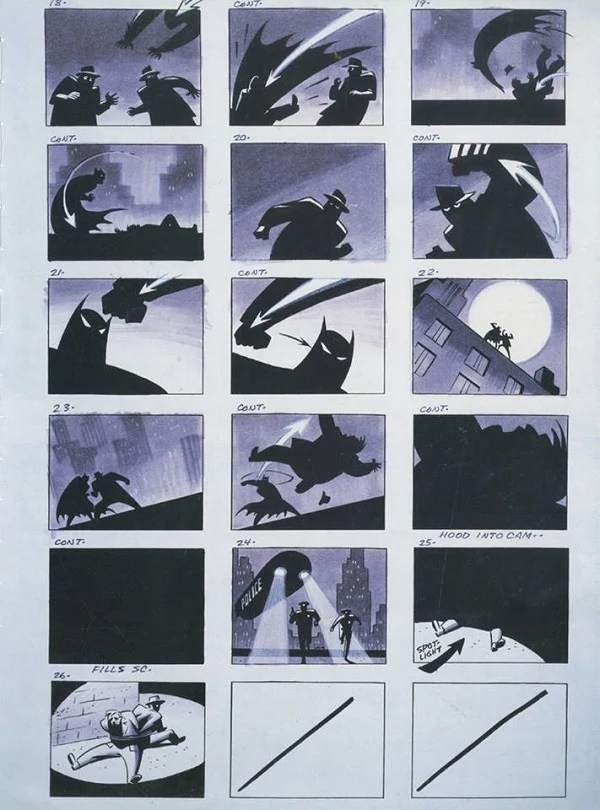
Batman: The Animated Series is an animated television series that follows Batman, the iconic superhero, adventure to protect his city. This detailed storyboard shows exactly where Batman enters the scene, how each punch lands (or misses) its target, and where different lighting – like the moon, or spotlights – is used throughout the scene.
Star Wars: Episode IV – A New Hope
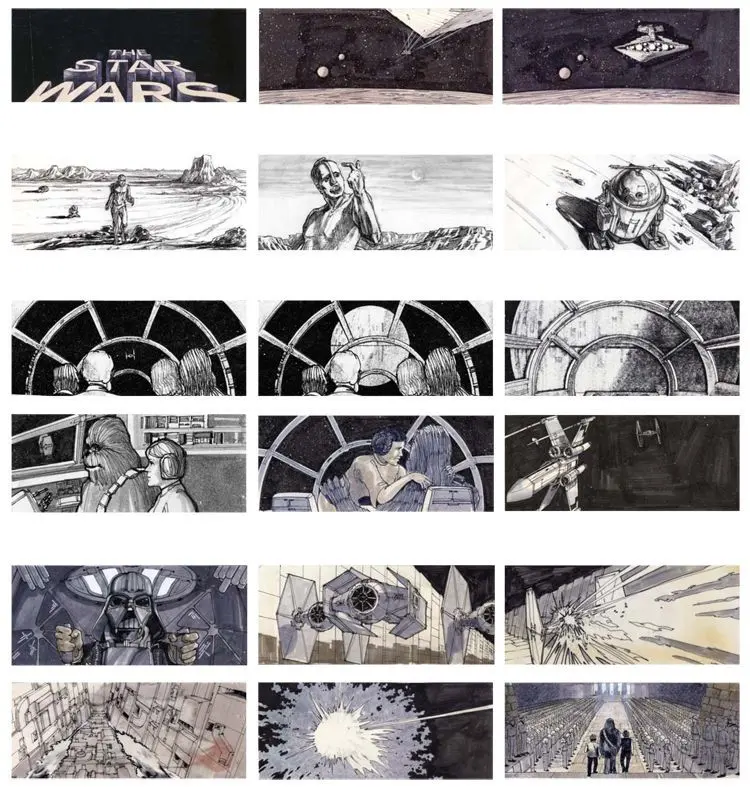
Star Wars: Episode IV – A New Hope is a famous sci-fi film about Luke Skywalker’s journey against Darth Vader and the empire. The iconic scenes like lightsaber fights and space battles are carefully drawn in its storyboard to capture the film’s exciting story.

Tips and Tricks for Storyboard Artists
Next, let’s explore some helpful tips and tricks you can use when creating your animation storyboard template.
Analyse Your Script:
Analysing the script helps capture key scene fundamentals in animation production, and eases how you would envision the workflow. That is why strong animation scripting comes before any sketching. Labelling storyboards provides an organized reference for sketching.
Thumbnails and Angles:
In storyboarding, sketch rough drafts to outline how you would foresee the finished film or final product. Focus on the big picture to enhance imagination and decide on included details for the overall image.
Thumbnails allows you to experiment with camera angles, determining which angles produce the best outcome. A quick refresher on camera shot types helps here. They offer a preview of the final result before finalizing the product.
Character’s Persona:
Capturing the character’s persona is crucial in character development. Animators envision the characters through script and voice recording, expressing emotions through facial expressions, body language, and actions seamlessly. This ensures an accurate interpretation of the director, production crew and client’s expectations.
Elaborate any Technical Details:
Precise instructions such as details on how the camera movements and angles are crucial information for animators. For example. Incorporating zooms, pans, tilts or specific transitions into the storyboard enhances its visuals.
These instructions can be conveyed through notes or arrows to indicate the desired direction, ensuring a smooth narrative flow.
Collect input:
Expect amendments after drafting your initial animation storyboard presentation. Seek feedback from clients and team members, incorporate adjustments, and transition to animation production upon satisfaction. Once your team and clients are satisfied, you can transition from pre-production to animation production.
Storyboard in other industries
Here are some of the examples of storyboard use in other industries
1. Theater
Most people think that storyboarding is not needed in the theater. However, in the needs of theatrical performances, storyboards are used to determine the required stage layout of the story.
2. Commercial
For advertising needs, storyboards are used as in the video needs described above. Storyboards are used to provide an overview of a video part or an idea from an advertisement that will be advertised. We go deeper into this in our guide to the video storyboard.
3. Business
Just like the film and video industry, storyboarding is also very important in the business world. This is related to the nature of consumers who are easier to remember information that has been processed into the form of stories. Business storyboards can also be used for other needs such as negotiating with clients or customer, customer stories, customer journey mapping, mentoring and training, presenting ideas to colleagues, business project presentation, creating tutorials, providing an overview of potential results, promoting product ideas, and demonstrating a process for a company’s product or service to the customer.
4. Education
Storyboards can be used for teaching activities. The use of storyboards can help make it easier for students to absorb more material because they are wrapped in simple concepts. The use of images is more effective when compared to audio and writing. In the world of education, storyboards can be used to create narratives, story-telling guides, summarize text, create illustrations, help memorize vocabulary, help with project presentation, trace characters in the word, show steps in an experiment, and create illustrated stories, and so on.
5. Social media content
Storyboards are also often used by social media content creators for various needs, especially in vlogs. Storyboards can be created in content planning or based on recordings that have been taken during the vlog production process.
Making storyboards after the production process takes place will allow content creators to freely record moments and take pictures in their entirety, whether the image will be used or not.
Meanwhile, making storyboards at the planning stage can help content creators focus on new impressions and experiences so that the recording is done only on certain parts of the vlog. Storyboards will also help content creators when they are doing video editing.
Also read: The Reason Why You Should Use Social Media Animation Videos
6. Technology
Engineers often make a storyboard in software development projects. Storyboards can help visualize the software customer experience better. That way, engineers can predict what problems will arise in software that is still in the development stage so that engineers will have plenty of time to make improvements to the software after it is released.
7. Research
In research needs, data can be presented visually with the help of infographics. To create animations based on data, you also need help from a storyboard. A graphic designer will create a storyboard to explain all the details needed by a motion graphic designer to make motion pictures.
8. Other entertainment industries
In the entertainment industry other than film and video, storyboards can be used in planning graphic novels or comics, narratives for animation, stage decorations, and shots taken in vlogs, TV, projects, and so on.
