



The cost of an augmented reality app is often presented as one wide market range. That number becomes less useful the moment someone asks what is actually included.
In our interactive work at SuperPixel, we have found that AR budgets become clearer when the brief starts with the user action, not the technology. What should someone scan, place, tap, inspect, unlock, or understand? Once that is clear, the production scope becomes easier to price.
That is the main principle behind this guide: do not start by asking how much an AR app costs. Start by defining what the experience needs to do.
Why AR App Cost Ranges Are So Broad
Two projects can both be called an augmented reality app and require completely different production plans.
A campaign experience may ask someone to scan a QR code, place one animated object in the environment, and reach a call-to-action. A product visualisation tool may need accurate scale, several product variations, stable surface tracking, and support across many devices. A training application may add sequential prompts, retries, analytics, and user accounts.
The label stays the same. The work underneath it does not.
For budget planning, the useful question is not “What is the average AR app cost?” It is “Which decisions make this version more complex than the simplest version that could still work?”
5 Things That Actually Change the Cost of an Augmented Reality App
Most AR budgets move because of five decisions.
1. What the User Needs to Do
Interaction depth changes the production shape quickly.
Placing one object and tapping one call-to-action is relatively contained. Asking users to switch views, recognise objects, follow branching instructions, collect items, or receive real-time feedback requires more UX thinking, development, states, and testing.
This is why we usually define the first useful action before discussing effects. If the first five seconds are unclear, adding more features only makes the confusion more expensive.
2. How the Experience Is Accessed
A standalone mobile app needs its own install flow, permissions, packaging, store submission, and ongoing support.
An AR feature inside an existing app can remove some duplication, but integration still has to fit the client’s platform, release cycle, and technical requirements.
Browser-based AR can reduce friction for campaigns because users can scan and launch without downloading another app. But “no download” does not mean “no development”. Loading speed, mobile browser behaviour, tracking stability, and real-world network conditions still have to be designed around.
3. How Much 3D Content Is Required
A single stylised object is a different production task from a realistic product, animated character, or complete virtual environment.
Modelling, texturing, animation, lighting, and mobile optimisation all contribute to the budget. Detail also needs to be appropriate for the device. A model that looks impressive on a workstation but stutters on a phone is not a better AR asset.
For projects where product accuracy matters, our 3D animation services can also support the modelling and animation work before assets are prepared for the AR experience.
4. How Many Devices and Conditions You Need to Support
A controlled event using managed devices is easier to test than a public rollout expected to work across a broad mix of iOS and Android phones.
Testing also goes beyond device lists. Lighting, camera distance, surfaces, hand position, orientation, permissions, weak connectivity, and failure states all affect how reliable the experience feels.
The wider the real-world conditions, the more time should be reserved for QA.
5. What Happens After Launch
Short campaign activations may need little maintenance. Longer-running applications can introduce hosting, analytics, SDK fees, content updates, localisation, moderation, operating-system changes, and support.
These costs are easy to miss because they are less visible than the animation or interface. They should still be discussed before launch, not discovered afterwards.
Where Your AR Budget Actually Goes
Once those five decisions are clear, a quote becomes easier to read. Instead of looking only at the final number, look at the workstreams underneath it.
- Strategy and scope define the audience, setting, user action, content hierarchy, and success measure.
- Interaction and visual design shape the user flow, prompts, interface hierarchy, placement guidance, and how information appears through the camera view.
- 3D production and optimisation cover the models, textures, animation, lighting choices, and technical preparation needed for mobile performance.
- Development and QA cover tracking behaviour, interaction logic, permissions, integration, testing, and failure states.
- Deployment and measurement can include hosting, app-store submission, launch support, analytics, and documentation.
A lower quote is not automatically a more efficient quote. Sometimes it simply contains fewer of these responsibilities. Clear line items make those differences visible.
How to Reduce AR App Cost Without Weakening the Experience
When budgets tighten, the first instinct is often to remove planning while keeping the feature list. We recommend the opposite.
Start by protecting the action that matters most, then remove anything that does not change what the user understands, feels, or does next.
Case Study: Re-Route Festival AR Monster
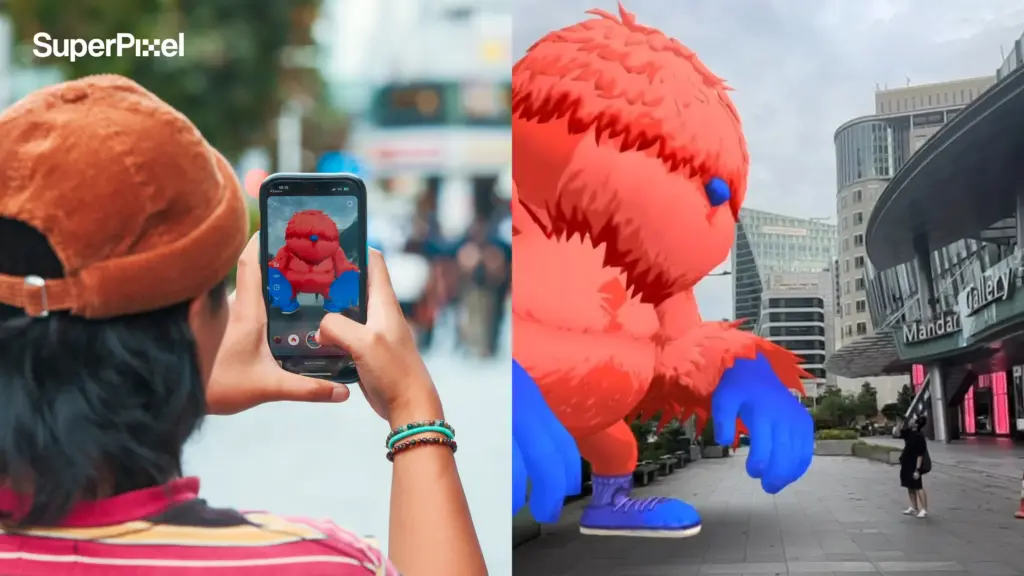
For PLUS Group Singapore’s Re-Route Festival AR Monster during Singapore Design Week 2024, SuperPixel developed an AR experience built around one immediate action: scan a QR code and bring a large animated monster into the Orchard Road environment.
The challenge was not to add as many effects as possible. The experience had to make sense quickly. The character needed to appear at a believable scale and perspective, while the payoff had to be obvious enough for a passer-by to understand without a long instruction sequence.
*video embed
That constraint helped keep the experience legible. It is a useful budgeting principle too: protect the interaction that carries the idea, then question every feature around it.
Extra views, decorative states, collectibles, or secondary interactions can all add production time. If removing one does not change the user decision, it is a strong candidate to cut.
Lean scope is not the same as weak scope. The goal is to spend on the parts that make the experience clear, stable, and believable.
What to Include Before Asking for an AR App Quote
A useful quote starts with a useful brief. Before contacting a studio, try to answer these questions:
Who will use the experience, and where?
What is the one action they should take first?
What business or communication goal should that action support?
Will users access it through a browser, an existing app, or a standalone app?
How many 3D assets, scenes, or content states are essential at launch?
Which devices or operating systems need to be supported?
What counts as success: scans, dwell time, leads, sign-ups, completion, or product understanding?
Will the content change after launch?
What needs to be handed over after production?
If you already have 3D models, brand guidelines, technical documentation, or an existing application, include that information as well. It can change both the workflow and the estimate.
Prototype, Pilot, or Full Rollout?
Not every idea should begin as a full application.
A prototype proves whether the core interaction works. A pilot activation adds enough real-world testing and measurement to learn from actual users. A full rollout makes sense when the experience needs broader device support, ongoing content, deeper integration, or long-term ownership.
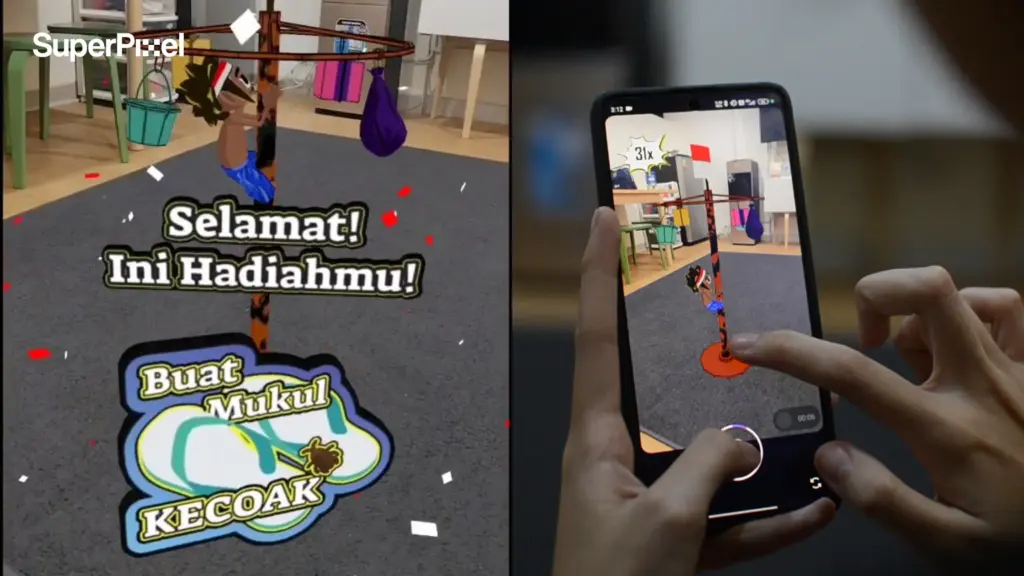
For another lighter AR approach, SuperPixel also created the Panjat Pinang AR Filter, turning Indonesia’s traditional climbing game into a playful digital interaction.
*video embed
Funding the smallest version that can answer the real business question is often a better starting point than paying for every imagined feature on day one.
Frequently Asked Questions
Does browser-based AR work offline at events?
Usually not by default. Most browser-based experiences need a connection to load the page and assets. If venue connectivity is unreliable, discuss it during scoping because it may affect asset delivery, caching, or whether managed devices are a better option.
Who should own the 3D files and source assets after launch?
Define this in the proposal before production begins. Some teams only need the finished experience. Others need editable models, source files, or usage rights for future campaigns. Handover requirements can affect both production time and licensing.
How much time should be allowed for app-store review?
Build in a buffer. Store review sits outside the production team’s full control, and permissions, metadata, account setup, or policy checks can delay release. A finished build is not the same as a launched application.
Planning an Augmented Reality App?
If you are budgeting an augmented reality app, start with the interaction that has to work rather than the longest possible feature list. For more on this, see our augmented reality OOH. For more on this, see our augmented reality marketing examples overview. For more on this, see our augmented reality animation guide.
SuperPixel can help shape the scope, 3D content, interaction design, and production approach around that core action. For more on this, see our interactive content production in singapore guide. Explore our selected projects or contact us to discuss what the first version needs to prove.