Have you ever watched a building come alive with light, movement, and illusion and thought, how is that even possible?
Think about your favourite animated movie. What made it unforgettable? Was it the lifelike visuals, compelling storytelling, or relatable characters? Now imagine being able to turn a physical venue, a stage, or even a product into that same kind of living canvas. That’s what 3D projection mapping does for your event.
As a Singapore-based studio working with brands, venues, and creative agencies, we’ve seen how projection mapping transforms previously static objects into dynamic storytelling platforms.
Whether you’re planning corporate events, product launches, or permanent installations, this technique offers a unique opportunity to create an immersive experience your audience won’t forget.
Key takeaways
- 3D projection mapping uses video projection to turn real surfaces into dynamic visual displays.
- Compared to 2D video mapping, 3D mapping creates a richer immersive experience by accounting for depth and spatial alignment.
- The right projection mapping software and projection mapping tools determine technical accuracy and visual impact.
- Large scale projection mappings increase brand visibility and audience engagement at live events.
- A clear workflow from surface prep to projector setup that ensures smooth execution and optimum expectations.
What Is 3D Projection Mapping and Why It Works
3D projection mapping is a technique used to project captivating visuals onto real surfaces.
Projection mapping transforms ordinary surfaces into dynamic displays by projecting digital visual content onto them. Using video projection and carefully aligned video projectors, we turn buildings, stages, or even small objects into animated storytelling platforms.
Projection mapping is used to create optical illusions by projecting visual content onto static surfaces. Previously static objects suddenly move, break apart, glow, or appear to float.
The technique of projection mapping can be applied to various surfaces, including buildings, stages, and small objects. Your display surface could be:
- A building facade
- A product installation
- A sculpture
- A custom-built stage element
- Even irregular real surfaces
Projection mapping has gained popularity in various fields like marketing, entertainment, and education. From museums bringing history and art to life, to retail spaces adding interactive layers, the concept continues to evolve.
3D projection mapping creates attention-grabbing displays that stand out in crowded environments. In a world full of LED screens, this technique feels fresh because it interacts with the real environment.
The immersive nature of projection mapping creates memorable experiences that can enhance audience engagement. When audiences see real world objects transform in front of them, the reaction is instant.
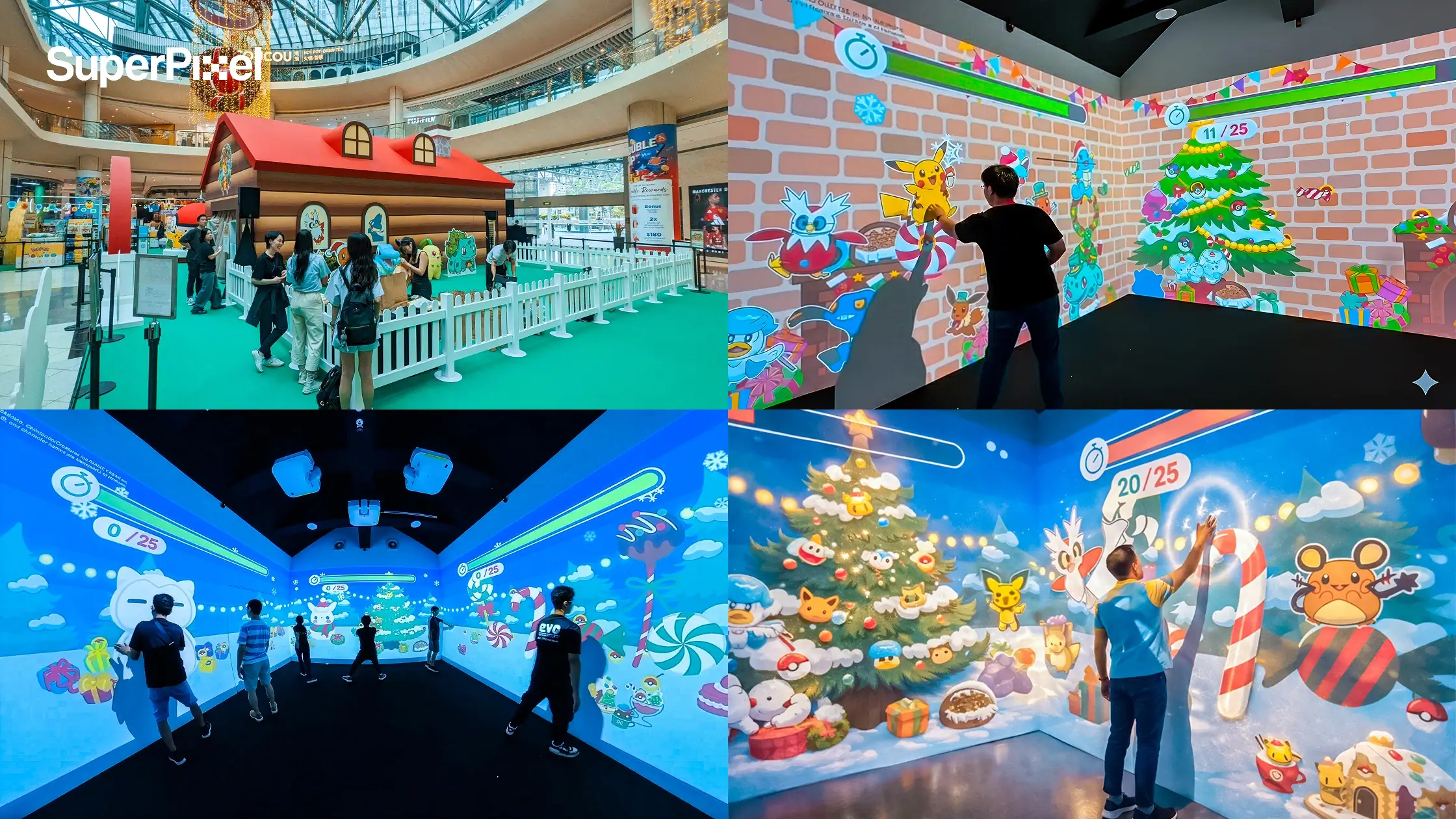
Case study – Pokémon Happy Holidays
For a holiday installation at Suntec City, we created an interactive wall mapping experience called Holiday Cabin, a snowy room where visitors could hunt for their favourite Pokémon.
To bring it to life, we built:
- Multi-wall immersive projection (projection mapping techniques): For Suntec City’s Holiday Cabin, we used projection mapping techniques to turn objects and three wall surfaces into one seamless winter scene, an example of how spatial storytelling works when you’re projecting videos across a connected environment.
- Interactive sensor control: The installation added spatial augmented reality-style interaction, with unique features where visuals and music reacted instantly to swipes and taps, so the experience felt playful while still staying clean and easy to follow.
The best part was watching visitors explore with genuine curiosity while the tech stayed quietly in the background, supporting the moment.
2D vs 3D Video Mapping: What’s the Difference?
The key difference between 2D and 3D projection mapping lies in the nature of the projection surface.
2D video mapping typically projects onto flat surfaces. It works well for flat backdrops and simple display surface setups.
3D projection mapping creates a richer, more immersive experience for the audience compared to 2D mapping.
3D projection mapping enhances the visual experience by accounting for depth and spatial concerns of the projection surface. That means mapping content around corners, edges, and physical elements.
Using 3D mapping offers a richer, more immersive experience for the audience compared to 2D mapping because it integrates depth and perspective.
3D projection mapping involves texturing a 3D model of a real-life object and then re-projecting the textured digital version onto the real-life version of the object.
Imagine being able to “wrap” animations around a complex object. That’s where 3D mapping moves into extra dimensions blending digital creativity with physical structure.
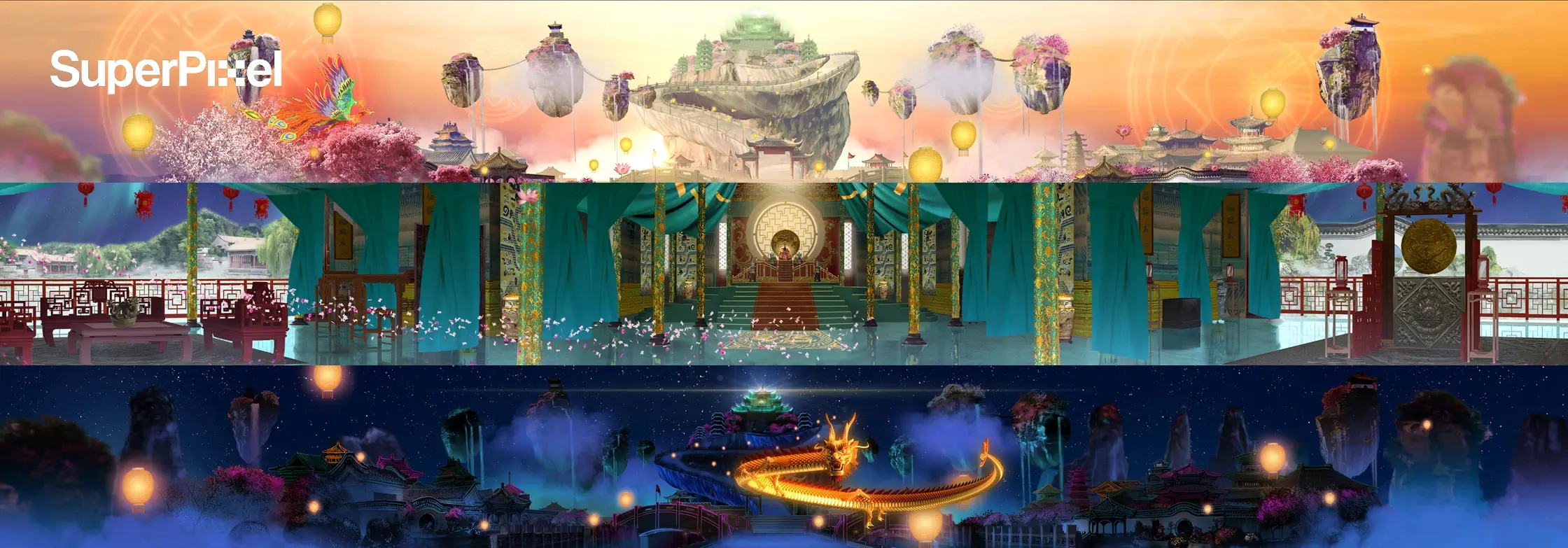
Where 3D Projection Mapping Shows Up in Live Events and Beyond
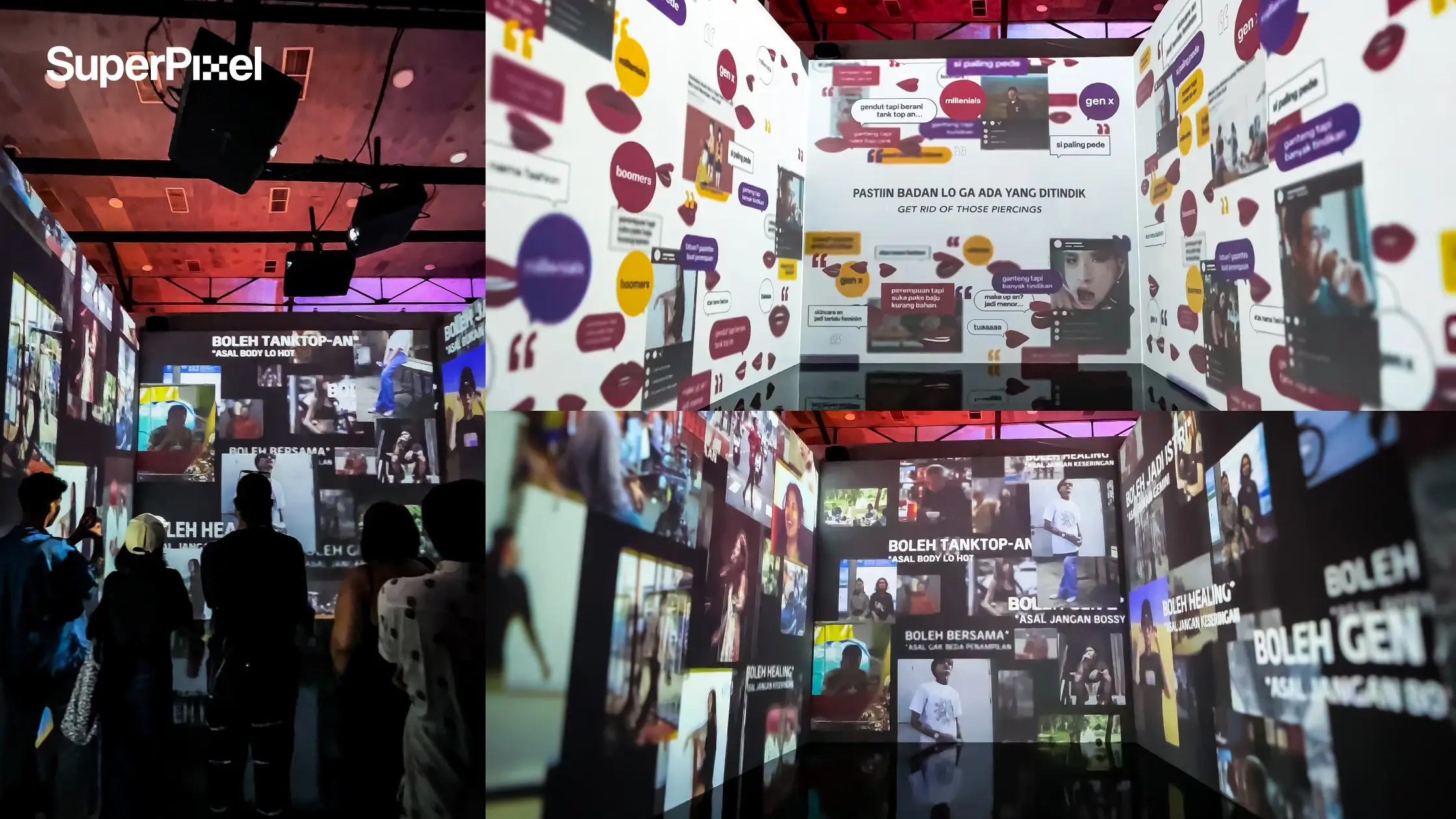
Businesses can use projection mapping to elevate experiences at corporate events, product launches, trade shows, and other gatherings.
Dynamic stage setups in live performances are enhanced with 3D mapping to create interactive environments. Stages become part of the narrative, not just a backdrop.
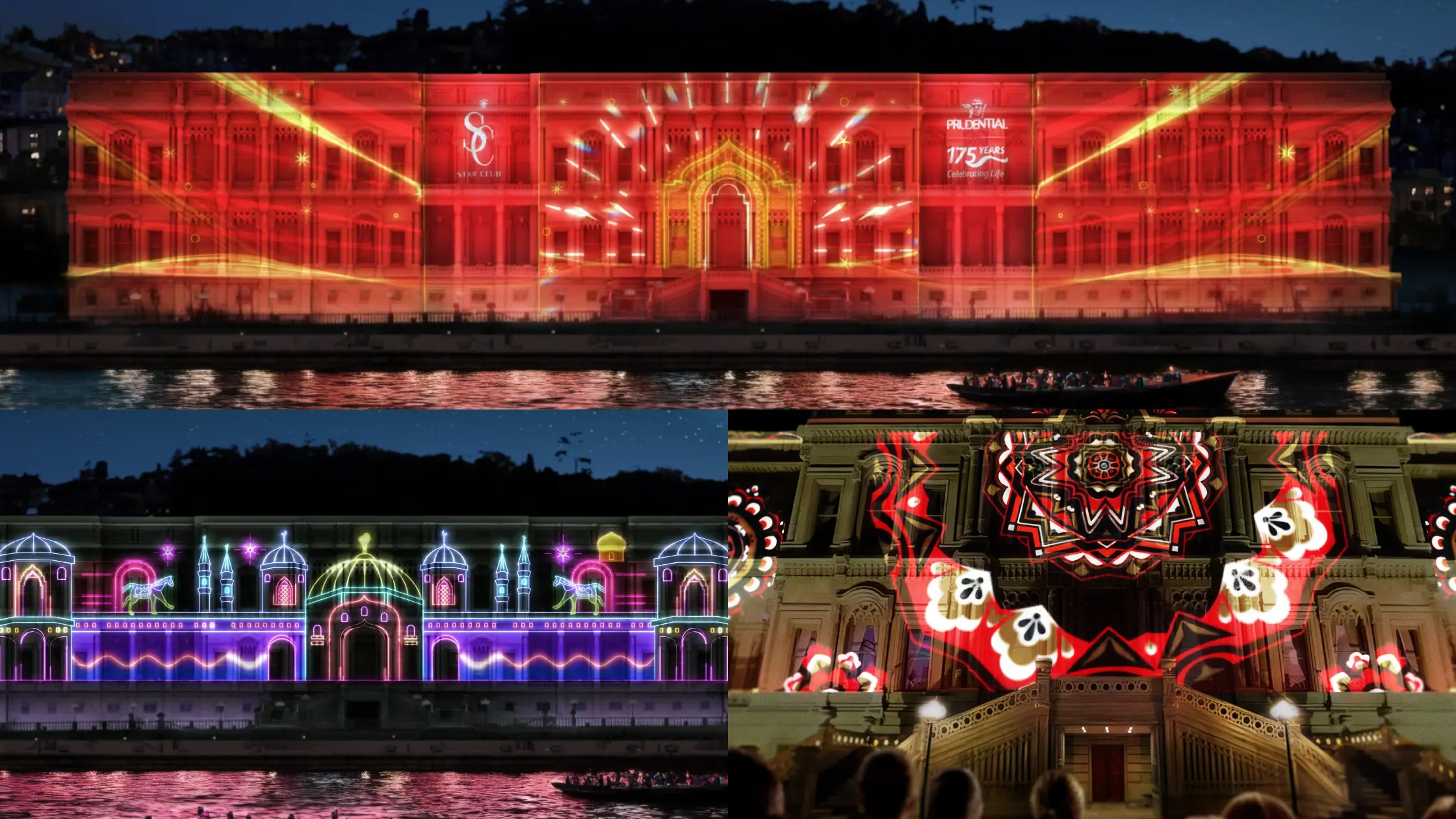
Projection mapping is commonly applied to architectural structures during major events, such as opening ceremonies. Think of large scale projection mappings like those seen at the Sydney Opera House, where buildings become storytelling canvases.
3D projection mapping is used in architectural celebrations, advertising, entertainment, and immersive art installations.
3D projection mapping can enhance museum exhibits by bringing static artifacts to life with animations. Large-scale projection mappings are often used in museums and digital art exhibitions to create unique visual experiences.
Projection mapping can be utilized in theme parks to create engaging and interactive experiences for visitors.
Projection mapping is used in retail spaces to enhance the shopping experience through interactive displays.
It has even been used to raise awareness about climate change through powerful visual storytelling — blending education, technology, and emotion.
Projection mapping can boost tourism by showcasing iconic landmarks and encouraging locals to rediscover their city.
Immersive Experience: What Brands Get Out of Projection Mapping Projects
Using 3D projection mapping can increase brand visibility and leave a lasting impression on an audience.
Projection mapping provides a dynamic and interactive advertising medium that helps companies convey stories to their customers.
Projection mapping allows companies to express their brand identity in a creative and artistic way, creating emotional connections with audiences.
Projection mapping is increasingly used in marketing to create attention-grabbing displays that enhance brand visibility.
This transformative technology is often used in events to create immersive experiences that are likely to go viral. When captured well in images and video clips, projection mapping installations become highly shareable visual content.
Leading brands like Samsung and Adidas utilize 3D mapping for marketing activations and product launches by proving that the technique scales from local live events to global campaigns.
Basic Workflow: From Surface Selection to Final Output
The process of projection mapping involves selecting a surface, placing a projector, defining the mapping area, adding visual effects, and importing content.
The projection mapping process involves several steps, including choosing mapping surfaces, placing the projector, and defining the area of mapping.
Here’s a simplified breakdown:
- Identify the projection surface
- Prepare the surface
- Model the object in a computer
- Design animations
- Align the projector’s XYZ orientation
- Test and refine
The process involves content creation, projection hardware, surface recognition, and mapping.
The first step in the basic workflow of 3D projection mapping is to identify and prepare the surface for projection.
3D projection mapping works by precisely aligning a projection with a real-world surface. Even small misalignments affect the illusion.
3D Surface Prep: Why a 3D Model Matters in Video Mapping
3D projection mapping requires creating a 3D model of the object to ensure accurate alignment of the projected content.
Creating a 3D model of the object is essential for ensuring that the projected content aligns perfectly with the real-world object.
3D projection mapping involves texturing a 3D model of a real-life object and then re-projecting the textured digital version onto the real-life version of the object.
In 3D mapping workflows, coordinates are set for the object’s placement relative to the video projector.
Without this, your optical illusions won’t work. The magic depends on precision.
Projection Hardware: Projector Specs That Make or Break the Show
High-lumen, high-resolution laser projectors are required for effective 3D projection mapping.
Brightness matters. So does resolution.
When setting up a projector for 3D projection mapping, it is important to consider the projector’s position, angle, and lens characteristics.
For large scale projection mappings on buildings, multiple video projectors are often used with edge blending to create seamless images.
Equipment selection affects complexity, scale, and cost.
Projection Mapping Software and Projection Mapping Tools
What projection mapping software features matter
Projection mapping software varies in features, including drag and drop capabilities, warping tools, and edge blending.
This technique uses specialized software to warp and mask images, allowing them to fit the contours of a 3D surface.
3D projection mapping requires a virtual program software to map the video to the object’s surfaces.
The right tools give creative agencies and AV companies control over fine adjustments.
Tools for real-time adjustments and warping
Tools like MadMapper, TouchDesigner, and Resolume are used for real-time adjustments and warping in 3D mapping.
These projection mapping tools allow real-time corrections — especially useful during live events.
TouchDesigner notes (including free version)
TouchDesigner is a popular tool for projection mapping that offers a free version for personal use. It’s widely used by artists exploring interactive installations and complex visual systems.
HeavyM notes (OS + sound reactivity)
HeavyM is compatible with both Mac and Windows operating systems.
HeavyM offers a sound reactivity module that automatically synchronizes the mapping with music — perfect for live performances where sound and light must move together.
Trials and non-commercial versions to test workflows
Many projection mapping software platforms offer free trials or non-commercial versions for users to experiment with before committing to full-scale projects.
Testing workflows early reduces risk later.
Planning Projection Mapping Projects: Scope, Complexity, and Cost
The complexity of a projection mapping project can significantly impact the total cost, which can be high for large events.
Factors include:
- Surface size
- Number of projectors
- Content length
- Animation detail
- Location constraints
As scale increases, so does equipment and coordination between AV companies, artists, and production teams.
Surfaces and Scale: What You Can Map (Even Irregular Shapes)
Projection mapping can be applied to a wide variety of surfaces, including irregular shapes and non-flat surfaces.
The technique of projection mapping allows for the transformation of any physical object into a dynamic display surface.
From curved structures to sculptures, almost any object can become a canvas.
The question isn’t “Can it be mapped?”
It’s “How do we map it creatively?”
History and Context: A Quick Note on How This Started
The first public display of projection mapping occurred in 1969 at Disneyland’s Haunted Mansion ride.
From that early concept, projection mapping evolved into a global art and entertainment technology. Today, it combines creativity, software, hardware, and storytelling into one integrated experience.
Use Cases That Keep Winning (Events, Retail, Museums, Landmarks)
Projection mapping is used to create captivating visuals on real surfaces, enhancing events and experiences.
Projection mapping is used in retail spaces to enhance the shopping experience through interactive displays.
Large-scale projection mappings are often used in museums and digital art exhibitions to create unique visual experiences.
Projection mapping can boost tourism by showcasing iconic landmarks and encouraging locals to rediscover their city.
Whether you’re planning corporate events, permanent installations, or one-night live events, the technique scales.
How to Choose the Right Setup for Your Event
Projection mapping provides a dynamic and interactive advertising medium that helps companies convey stories to their customers.
The immersive nature of projection mapping creates memorable experiences that can enhance audience engagement.
Using 3D projection mapping can increase brand visibility and leave a lasting impression on an audience.
So how do you choose the right setup?
- Define your surface
- Understand your audience
- Align scale with budget
- Choose the right projection mapping software and tools
- Work with experienced creative agencies
At SuperPixel, we’re not just animators, we’re storytellers! We help brands turn real environment into immersive canvases that blend art, technology, and strategy.
Ready to bring your vision to life? Let’s create something that transforms your next event into an unforgettable immersive experience.