You go live. The first minute feels solid. Then the drop-off hits like…views slide, chat slows, and the replay graph looks like a ski slope.
Sound familiar? Live streams are fast, and attention is even faster. When the visuals don’t help people follow what’s happening, they bounce.
Key takeaways
- Live broadcast animation helps maintain viewer attention during livestreams
- Visual cues such as overlays and lower thirds improve content clarity
- Interactive graphics encourage audience participation
- Performance metrics like watch time and retention rate reveal animation impact
- Strategic animation planning leads to stronger livestream engagement
Why many live broadcasts struggle to retain viewers
Live content has a built-in challenge: viewers can join late, miss context, and feel lost in seconds. If your stream looks like a raw camera feed with no visual guidance, people have to work to understand the story. Most won’t.
How animation influences audience attention in live broadcasts
Animation acts like a visual “director.” It tells your viewer where to look, what matters now, and what to do next.
Organizations employ animated lower-thirds and infographics during live webinars to simplify complex information.
Educational Voice’s 2025 write-up on animation and engagement points out how animation supports retention and clarity by turning information into more digestible visual stories.
Think about it like subtitles for structure not just words, but meaning.
Why viewers leave within the first minutes of a livestream
Early drop-off often comes from:
- No orientation: Who’s speaking? What’s the topic? What’s the agenda?
- No pacing: Long pauses, awkward screen switches, dead air
- No cues: Viewers don’t know what to pay attention to
- No participation hooks: Nothing invites chat, polls, or reactions
When your first 30 seconds look the same as minute ten, people assume “I can leave now and catch the recap.”
Live broadcast animation overview and why brands use it
Live broadcast animation is a set of motion assets designed for real-time use that overlays, lower thirds, transitions, animated data, interactive prompts, and branded elements.
Live animation uses motion capture, face tracking, and game engine technologies to render digital assets immediately in response to a performer or operator.
Virtual avatars on platforms like Twitch and YouTube mirror creators’ facial expressions and head movements in real-time.
Live animation relies on a “puppeted” system where an actor’s movements and facial expressions are translated onto a 3D or 2D character in real-time.
IBM Think’s live streaming explainer (it cites 2025 market sources) describes live streaming as two-way by nature such as comments, reactions, real-time interaction, so the visual layer should support that live feedback loop
Types of live broadcast animation that improve viewer retention
Not every stream needs a full virtual studio. The goal is simple: make the viewer’s brain do less work.
Animated overlays that guide viewer attention
Overlays can:
- Highlight a product feature while the host demos it
- Add a subtle “Now showing” label when you switch segments
- Keep a persistent agenda bar (“1/3: Problem • 2/3: Demo • 3/3: Q&A”)
Small motion beats static clutter. A gentle pulse or slide-in beats a wall of text.
Lower thirds and visual cues that keep audiences oriented
Lower thirds answer questions viewers ask silently:
- “Who is this?”
- “What are they talking about?”
- “Why should I care?”
Best practice: keep them short, timed, and consistent. If names and roles appear cleanly every time, late joiners can catch up instantly.
Animated transitions that maintain viewing momentum
Transitions are where attention dies. A quick animated stinger:
- Signals a segment shift
- Masks technical cuts
- Adds rhythm to the stream
It’s the difference between “wait, what happened?” and “okay, new chapter.”
Branding elements in live broadcast animation
Branding isn’t only a logo in the corner. It’s a repeatable system:
- Color-coded topic tags
- Icon language (product, tip, warning, Q&A)
- Motion style (snappy vs smooth)
- Typography rules
Maintaining brand consistency requires a consistent color palette and typography across all graphics in a broadcast. Consistency makes the stream feel intentional, which buys you trust and watch time.
Interactive broadcast overlays that increase viewer engagement
Interactive overlays turn passive viewing into participation:
Modern broadcasts utilize automated systems to transform live data into dynamic on-screen animations.
- “Vote now” sliders
- On-screen question prompts
- Live comment highlights
- Reaction meters (“🔥 level rising”)
When viewers see their input reflected visually, they stick around to see what happens next.
Animation formats that work best for real time streaming
Live animation requires the software to output characters with a transparent alpha channel for seamless integration with live footage. Choose formats based on your tech stack:
- Real-time graphics (HTML/NDI/OBS browser sources): great for dynamic data
- Motion packs (pre-rendered): stable, lightweight, easy to run
- Lottie (for web-based streaming pages): compact and scalable for UI overlays. Free live stream animations enhance the dynamism of websites by highlighting live events and broadcasting features.
Tools like Adobe After Effects are suitable for creating complex motion graphics in live broadcasts. In other things, real-time rendering engines like Unreal Engine or Unity render the 3D model, lighting, and textures instantly as the show progresses.

Measuring the impact of live broadcast animation
Animation isn’t “nice to have” if it changes behavior. Measure it like you would any product change: one variable at a time.
Key metrics to track during live broadcasts
Track the basics, then get specific:
- Average watch time
- Audience retention curve (where people drop)
- Chat messages per minute
- Click-through rate (links, pinned comments, QR scans)
- Follows/subscribes during key moments
- Replay completion rate
In Turning Clicks Into Customers (2024), the recurring theme across funnels is: set a baseline, track engagement, then iterate based on real metrics.
How animation affects watch time and engagement
Animation tends to move metrics through:
- Faster comprehension (less confusion, fewer exits)
- Cleaner pacing (less “dead air” feel)
- Higher participation (more prompts + clearer CTAs)
If you see the retention curve flatten during segments with overlays, that’s a signal.
Performance tracking technologies for live streams
Common tools include:
- Platform analytics (YouTube Live, TikTok Live, LinkedIn Live, Twitch)
- OBS / vMix logs and scene timing
- UTM tracking for links shown during animated callouts
- Heatmaps for landing pages used during streams
Running small visual tests during livestream events
Keep it simple:
- Pick one segment (first 3 minutes is ideal).
- Run version A with basic lower thirds.
- Run version B with lower thirds + agenda + a “comment prompt” overlay.
- Compare: retention at minute 1 and minute 3, chat rate, clicks.
Think of it like a flipbook: one extra frame can change how smooth the motion feels. Same content, different experience.
Real world examples of live broadcast animation
It sounds gimmicky on paper, but it works Live animated characters can appear and interact with hosts or guests in live television shows.
In sports, 3D animated data and AR graphics overlay to explain plays, show player statistics, or create virtual sets.
Superpixel case study: CPLT20
video embed:
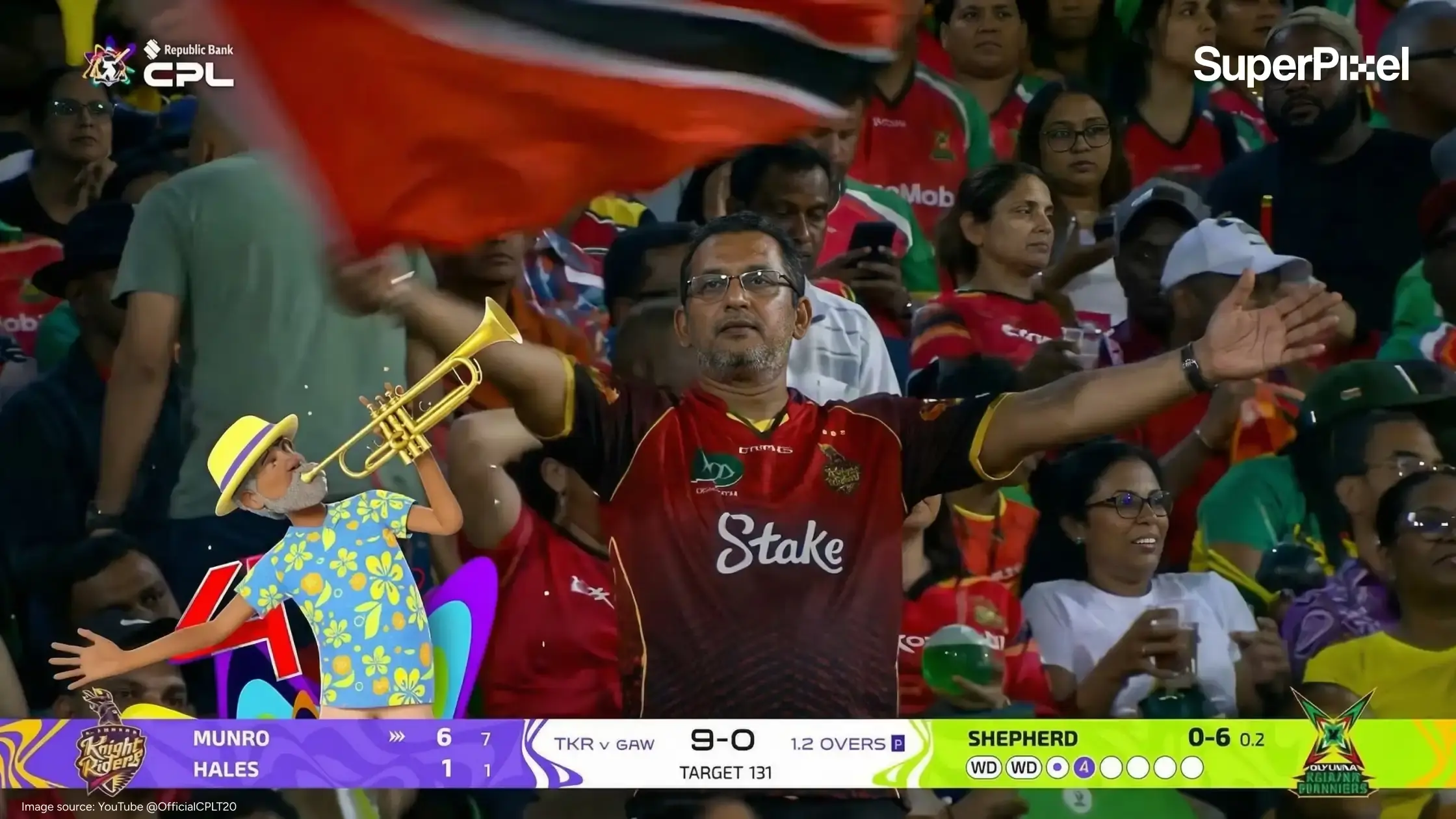
A nice example of this is CPLT20, a Caribbean cricket tournament with a global broadcast audience.
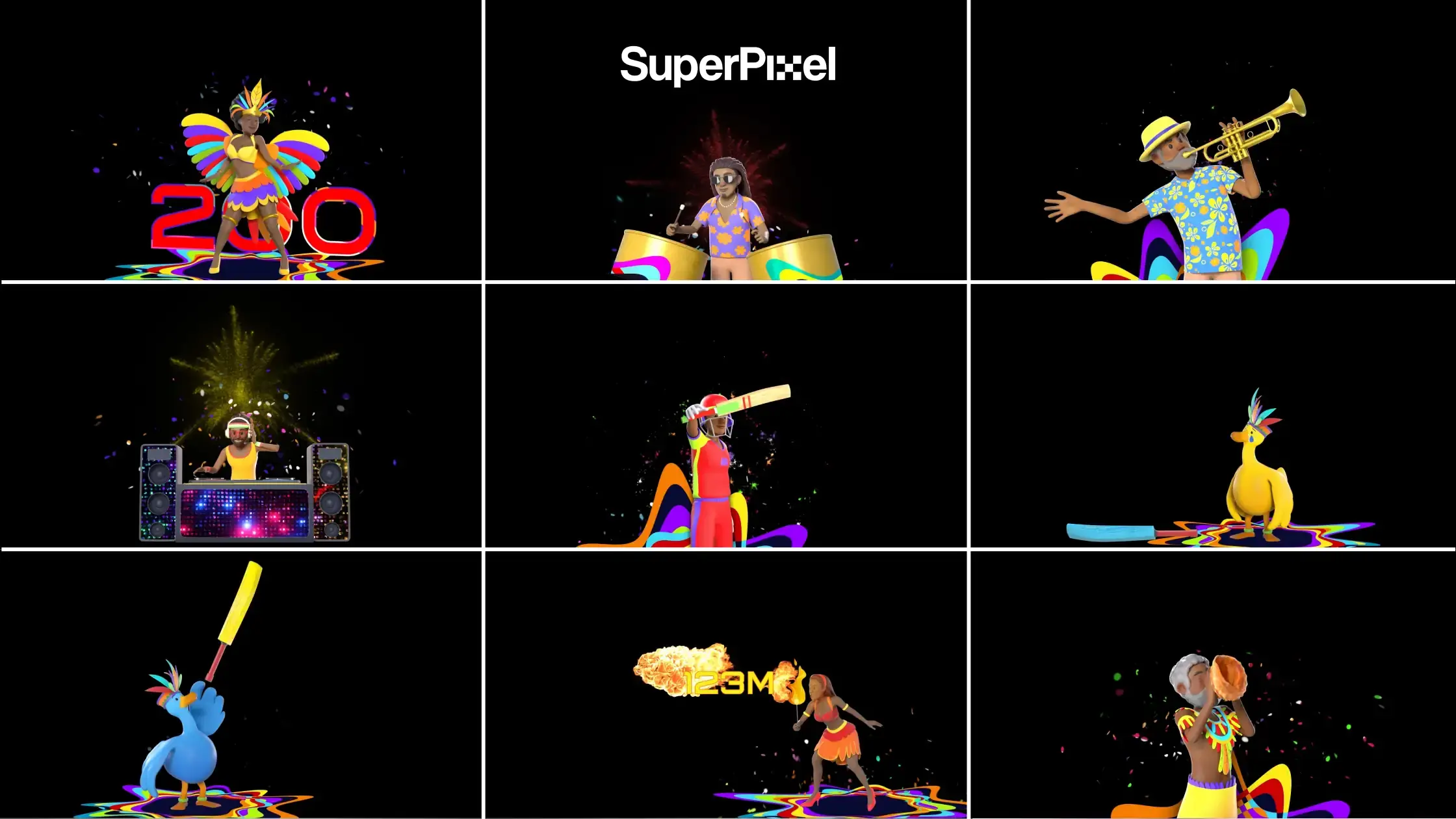
For this project, Superpixel took CPLT20’s existing character lineup and brought them into 3D for transitions, stings, and those quick moments in between plays.
They may only appear for a few seconds, but that’s exactly why they matter. In live sports, those small moments help keep the energy up, carry the rhythm of the broadcast, and make the whole viewing experience feel more alive.
Characters like Moko Jumbie, inspired by the Caribbean stilt-walker tradition with West African roots, gave the package a stronger sense of personality and cultural flavour.
So instead of feeling like filler, these animated moments helped the broadcast feel more distinctive and more entertaining to watch.
Redmart “Shop Without Breaking A Sweat”
The same engagement-through-motion logic also appears in shorter campaign formats.
For Redmart’s “Shop Without Breaking A Sweat”, Superpixel created punchy 10-second 3D animations built for fast, scroll-stopping consumption. These short beats helped maintain momentum instead of letting attention dip.
The campaign reached over 1 million views with a strong view-through rate, showing how tight motion pacing can hold attention when audiences have endless alternatives.
That same short-form “stinger” logic maps cleanly to livestream transitions, bumpers, and segment breaks.
A practical framework for improving livestream engagement
If you’re thinking, “Cool… where do I start?”, here’s a workflow that decision makers can actually run.
A practical 30 60 90 day broadcast improvement cycle
Day 0–30: Fix clarity
- Add lower thirds for speakers and segments
- Add a persistent topic tag and simple agenda bar
- Create 3 reusable transitions (intro, segment change, outro)
Day 31–60: Add participation
- Build 2–3 interactive overlays (poll prompt, Q&A prompt, comment highlight)
- Add one animated “recap” card every 5–7 minutes
Day 61–90: Upgrade the system
- Build a modular broadcast package (templates + rules)
- Add dynamic data (live results, rotating FAQs, product feature cards)
- Standardize motion timing so the show feels consistent
How live broadcast animation integrates into streaming platforms
In practice, most teams run this through:
- OBS/vMix scenes
- Browser sources for dynamic overlays
- Pre-rendered motion assets for stability
- Platform-native tools (pinned comments, polls) enhanced by on-screen prompts
When cost effective animation works for live broadcasts
You can get strong results with:
- A clean lower-third kit
- 2–3 transitions
- One interactive prompt template
- A ruleset for timing and placement
This is often enough to lift retention in the first minutes. Live animation can be cheaper than live-action for certain productions by eliminating the need for physical sets and props.
When to upgrade from simple overlays to custom animation
Upgrade when:
- You run recurring live series (weekly/monthly)
- You need dynamic data overlays
- Multiple hosts need a shared visual system
- You’re seeing drop-offs at predictable moments you can “bridge” with motion
Choosing the right live broadcast animation strategy
What we learned from building interactive animation systems
Interactivity isn’t just “more stuff on screen.” It’s a feedback loop: ask → show response → reward participation.
Broadcast Beat’s 2024 breakdown of Adobe Character Animator highlights real-time character performance and live compositing workflows, which is useful context for where live animation is heading.
I’ve found the best streams treat animation like a host’s co-pilot that supporting the message, not competing with it.
In the other hand, Motion Capture (MoCap) involves a performer wearing sensors to track body, facial, and hand movements, transferring them instantly to a digital avatar.
Questions to ask before commissioning live broadcast animation
- Where exactly do viewers drop off?
- What does a late joiner need to understand in 5 seconds?
- Which moments need pacing support (segment shifts, Q&A, demos)?
- What actions matter most (comment, click, purchase, sign-up)?
- What’s your technical setup (OBS, vMix, platform-native)?
When to work with an animation studio for live broadcasts
Work with a studio when you need:
- A cohesive broadcast system (templates + motion language)
- Asset kits that scale across shows and teams
- Strong design restraint (clarity beats clutter)
- Motion that matches real-time constraints
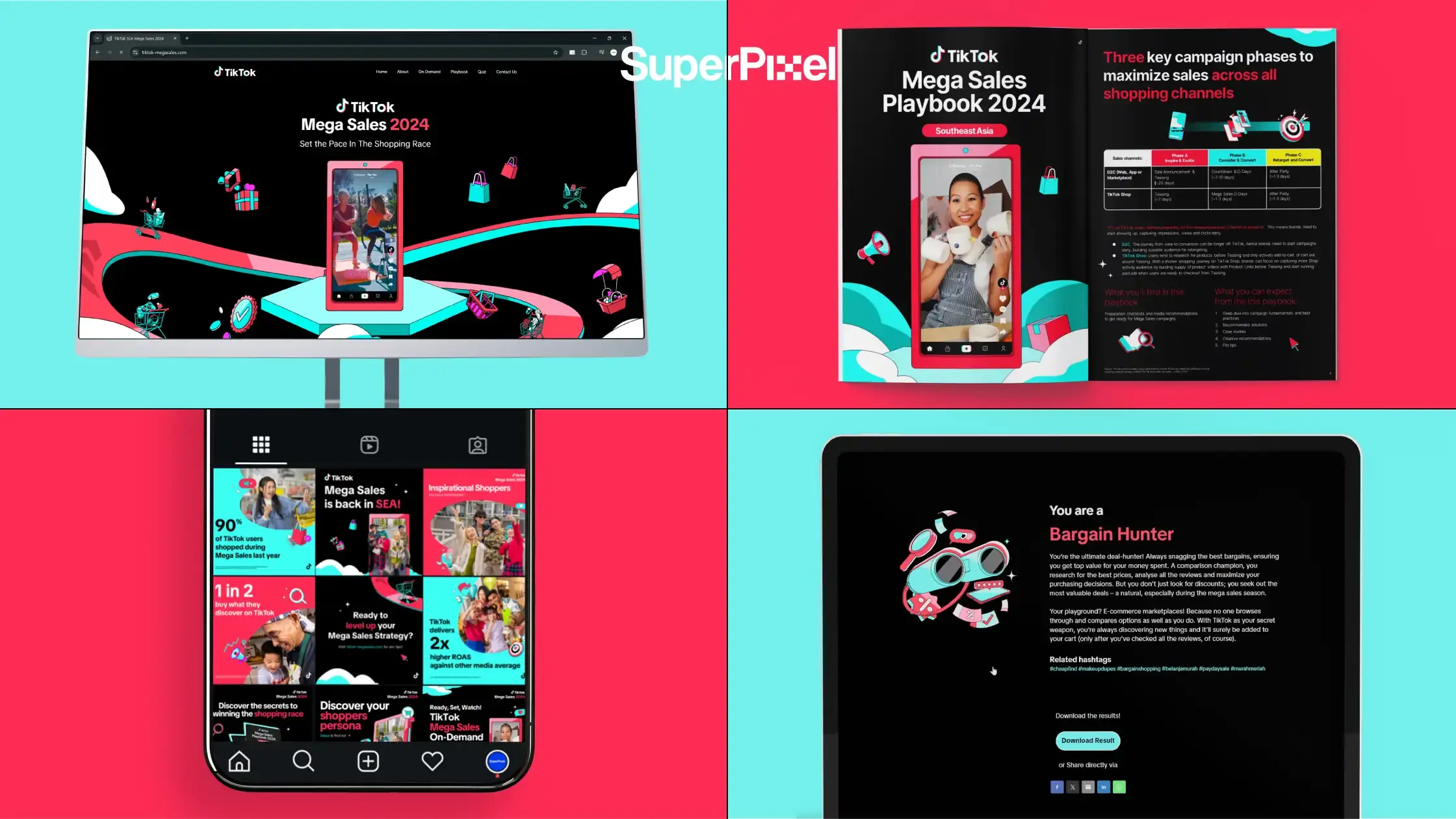
One more Superpixel example (relevant to structured storytelling for campaigns): TikTok Mega Sales 2024.
For TikTok’s pan-Southeast Asian initiative, we produced an integrated suite of digital assets such as website, landing page, sizzle video, social graphics, and email templates, built to guide business audiences through a clear narrative.
The outcome: stronger appeal among business executives and a cohesive visual guide for the campaign.
That same “one system, many touchpoints” approach is what makes livestream animation packages work: consistent visuals, consistent story, less viewer confusion.
Quick recap
If your retention is dropping, don’t only blame the host or the topic. Look at the visual story. Add orientation. Add pacing. Add participation cues. Then measure what changes.
Ready to bring your vision to life? Start by auditing your first 60 seconds because that’s where most streams win or lose the room.