AI animation sounds like an easy win for marketing teams.
You type a few prompts, wait a minute, and suddenly a draft video is sitting on your screen.
For a team racing toward a product launch, that can feel like a huge help, especially when social ads, landing page visuals, and an explainer video still need to be finished.
But a fast draft is only the beginning. The video still needs the right message, the right visual style, and enough clarity to actually support the campaign.
What AI Animation Means for Marketing Teams Today
A product manager opens an ai animation generator. They type a short text prompt describing the product.
A few seconds later, a draft animation appears. Icons move. Characters explain the feature. A voiceover reads the script.
This is how ai animation is entering marketing teams. With simple prompts, AI tools can create animated videos almost instantly.
But the first draft is rarely the final video. Teams still review the scenes, adjust the visual style, and refine the story.
AI can generate the animation. Marketing teams still shape the message.
Why Marketing Teams Are Exploring AI Animation to Create Animated Videos
A marketing team prepares a campaign for next week. They need social media clips, landing page visuals, and a short explainer video.
Normally, the animation process would take weeks.
Now someone opens an ai video generator. They type a few written prompts and a draft video appears.
This is why ai animation is spreading inside marketing teams. AI tools let marketers create animated videos quickly, test ideas, and generate visuals for social platforms.
The first version is rarely final. Teams still review the scenes, refine the visuals, and adjust the story. But the starting point is much faster.
How AI Generated Animations Became Visible in Creative Workflows
A few years ago, creating animation required specialized software. Designers needed strong graphic design skills and deep animation experience.
Today, many teams start with ai powered animations instead.
They type simple prompts. The system generates characters, scenes, and basic motion.
Tools that combine text to video, video prompts, and automated animation now allow marketers to create ai animations without advanced technical skills.
Most of these tools also provide export options in formats that work well across social media, websites, and other digital platforms.
This makes them useful for content creators and marketing teams that need animated videos in different versions for different channels.
Many creators also use AI to support traditional workflows rather than replace human animators completely.
For example, AI can help turn scripts and rough ideas into animated videos for explainers, tutorials, and social media content, while creative teams still refine the visuals, shape the story, and guide the final output.
These tools do not replace professional animation. But they give teams a faster first draft before the full production process begins.
Case study of how SuperPixel used AI in recent project
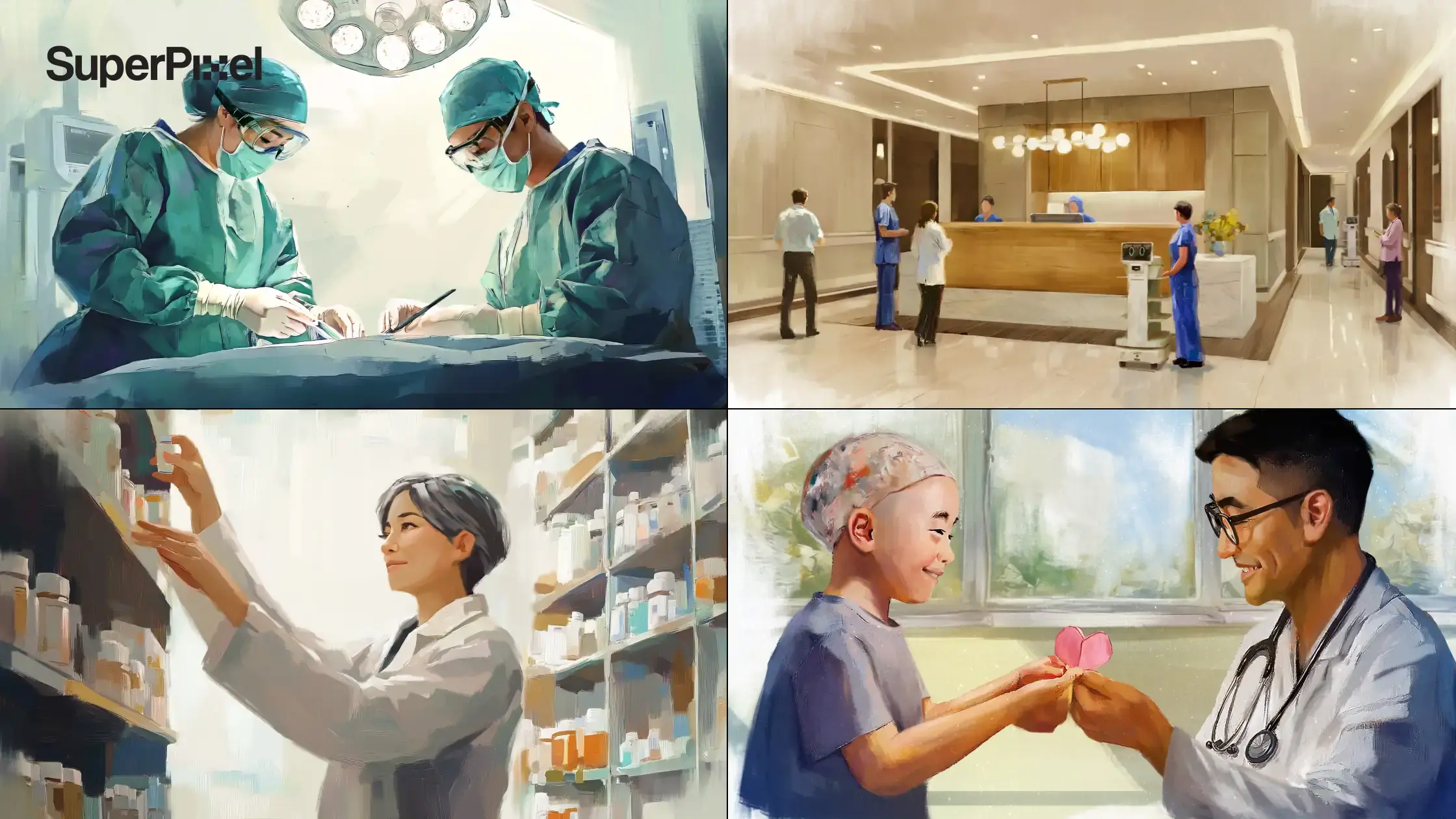
Mount Elizabeth Hospital: Using AI to Put People at the Center of Healthcare Storytelling
People walk into a hospital lobby, glance at the screen, and keep moving. Most hospital branding shows buildings, machines, and polished spaces. But patients rarely remember the walls. They remember the people who cared for them.
For Mount Elizabeth Hospital, Superpixel used AI generative tools to build a storytelling piece that turned doctors, nurses, cleaners, and chefs into moving brushstrokes of care.
We adjusted the colors, backgrounds, animation style, voiceovers, music, and on-screen text so the piece felt calm, warm, and human from the first second it appeared.
The piece now plays daily in MEH’s refurbished lobby, where patients and visitors see it while they wait. Instead of another corporate display, the screen gives them a quieter moment to look, recognise, and reflect.
The result was simple and clear: staff felt seen, visitors felt warmth, and the brand left a more human impression.
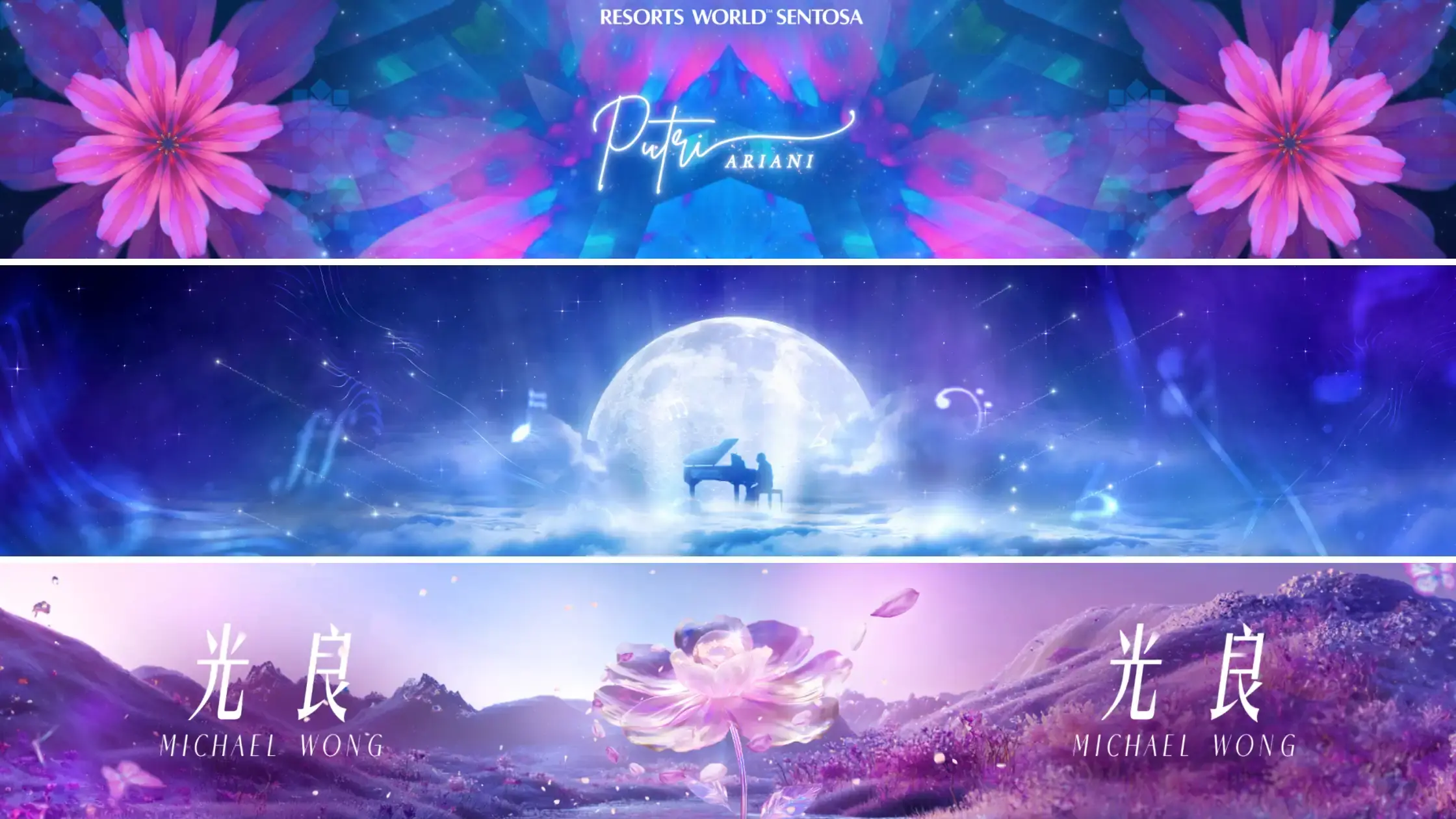
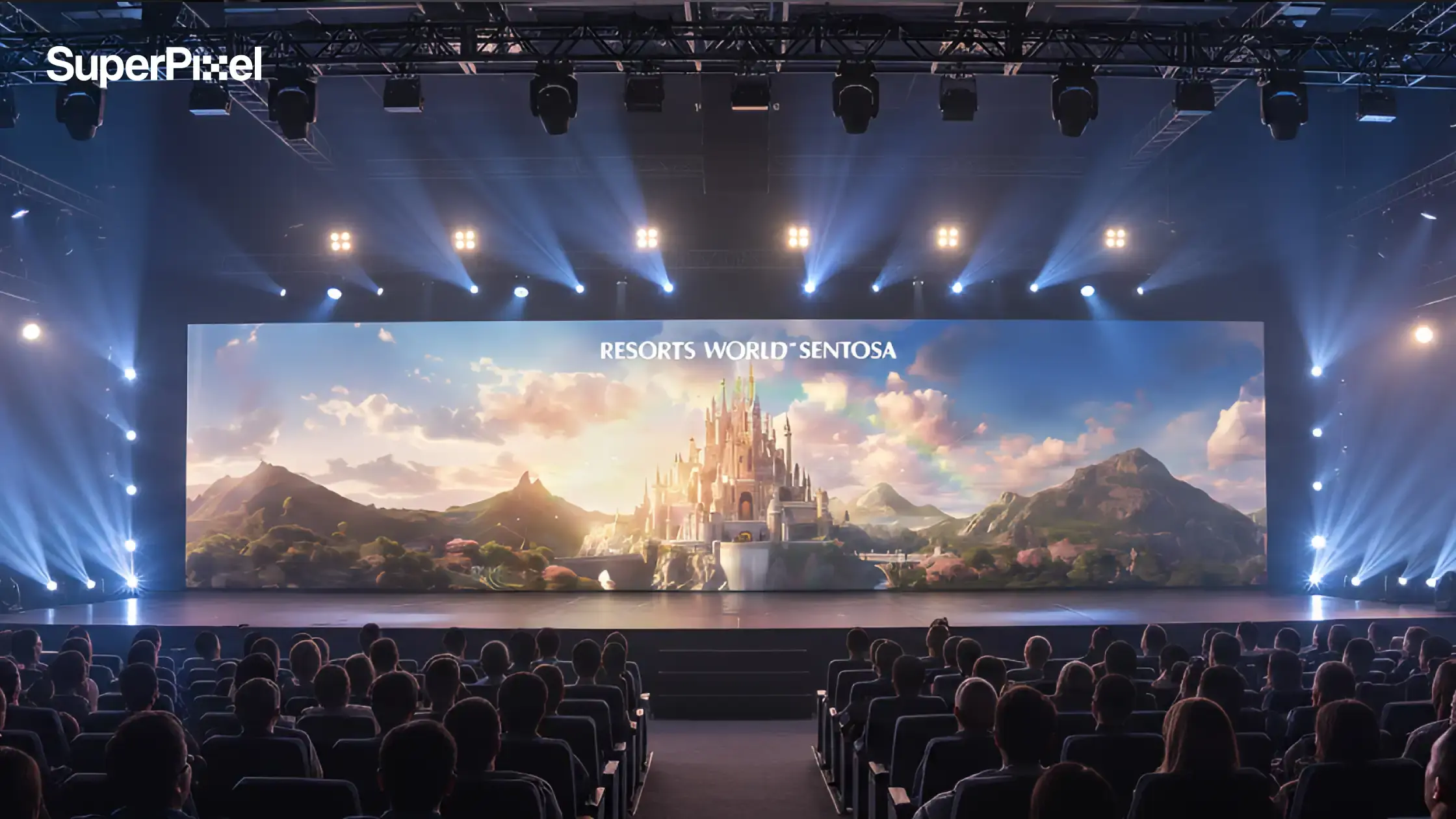
RWS Lebaran Dinner & Concert
People walk into a ballroom, look up, and the screen starts to move.
Patterns build across the LED. A butterfly wipes through the frame. Pink and purple petals trail behind it. Before the final show visuals were locked, we needed to find the right mood first.
For RWS Lebaran Dinner 2025, we used AI in the early ideation stage to explore styleframes faster. We tested visual directions through rough mockups, floral kaleidoscope references, and quick composition studies before moving into the final animation work.
That helped us shape the tone early, then refine the details through feedback on contrast, motion, and how the visuals would sit against the stage and live performance.
AI helped us get to the look faster. The final piece still came from choosing, refining, and making sure every frame felt right in the room.
Where AI Powered Tools and Video Generation Promise Speed
AI tools mainly accelerate the early stages of the animation process.
A product marketing team might open an AI animation maker, type a short description of a product feature, and generate a quick AI generated video explaining it. The draft may not be perfect, but it helps the team visualize the idea immediately.
Today, several AI animation tools offer this type of workflow.
Platforms such as Runway, Luma Dream Machine, and Pika Labs allow users to generate videos directly from text prompts, while tools like DeepMotion can convert simple video footage into animated characters.
These tools help marketing teams move from an idea to a visual concept much faster.
Many AI animation generators are also designed to be user-friendly, so even non-animators can create rough animated videos without advanced animation skills. Users can quickly adjust colors, animation styles, or audio to match the tone of the content.
Later, designers can refine the scenes, adjust the visuals, and turn the concept into a polished campaign asset.
In this way, animation with AI often acts as a rapid prototyping tool for marketing teams.
AI Animation Generators Marketing Teams Are Testing
Marketing teams usually start the same way.
Someone opens an ai animation tool and tries a quick test. They type a prompt, generate a draft video, and see what happens.
Some tools are built for speed. Others give more control for marketing videos and campaign visuals.
Popular AI animation tools include Runway, Luma Dream Machine, and Pika Labs for text-to-video, and DeepMotion for character animation.
Text to Video and Animation Generator Tools for AI Generated Animations
Many teams begin with text to video systems.
A marketer types a short text prompt into an animation generator. The prompt might describe a simple scene, such as a smartphone interface explaining a payment process. Within seconds, the system produces animated visuals based on that instruction.
The AI animation generator allows you to create animated videos from text using AI, making it accessible to anyone looking to develop an animation without advanced technical skills.
Runway offers cinematic text-to-video and video-to-video capabilities as a market leader.
AI Animation Video Generator Platforms and AI Video Generator Systems
More advanced tools work as full ai animation video generator platforms.
A user uploads a script, selects characters, and the system assembles scenes automatically. The platform may also generate voiceovers, suggest background music, and build a complete animation video.
Many of these platforms also help teams handle production work more efficiently. AI tools reduce manual labor by automating complex tasks like in-betweening, lip-syncing, and character rigging.
AI animation tools like Adobe Firefly integrate into established workflows to speed up tasks like rigging and simulation.
Real-time preview features enable users to see updates to scenes, text, timing, and visuals as they make changes.
Integration with other creative tools enhances the animation workflow by allowing seamless transitions between different applications.
Many of these platforms are marketed as the best ai video generator options for businesses that need faster video creation. They usually include libraries of characters, templates, and visual styles designed for marketing content.
For marketing teams, these tools provide a quick way to turn early ideas into visual drafts.
Free Animation Maker and Free Animation Software Options
For experimentation, many marketers begin with free animation software or a free online animation maker. These platforms offer limited features but allow teams to test ai animation without a large investment.
Examples of typical features include:
- simple character animation
- template-based animation styles
- automatic voiceover options
- downloadable free videos
Free tools are useful for internal content or school projects, though businesses producing client work usually require more advanced features and stronger usage rights.
How to Compare the Best AI Video Generator Options
Most marketing teams don’t choose an AI video generator immediately. They test a few tools first, generate a draft video, and see what the platform can actually do.
Some tools focus on speed. Others offer more control for editing, customization, and campaign visuals.
Quick Content Versus Creative Control in AI Video Generator Tools
An ai video generator can produce a video quickly, but speed often reduces creative flexibility. Some tools rely heavily on templates, which limits how much the user can change the visuals or animation.
Marketing teams evaluating the best ai video generator often compare two factors: speed and creative control. Fast tools produce quick drafts, while more advanced platforms allow teams to edit scenes and refine motion.
Balancing these factors helps determine which tool suits a campaign.
Customization, Refinement, and Commercial Use of AI Generated Video
Businesses using AI tools for commercial use should evaluate customization options carefully. Many ai generated animations look similar because they rely on shared templates.
Key features to review include:
- ability to fine tune motion and visuals
- support for custom animation styles
- integration of brand assets
- control over visual style and colors
These features allow teams to produce professional animations rather than generic visuals.
What to Check Before Using an AI Video Generator for Client Work
Before adopting an ai animation generator for client work, businesses should confirm a few practical details.
To create an animation with AI, simply log into the platform, head over to the AI Animation Generator, and provide a description of what you want to animate.
You can preview your animation in real time as you make changes, allowing you to refine your animation on the fly and get the exact result you want.
Even with that convenience, businesses still need to review a few practical points before using AI-generated content in live marketing campaigns:
- usage rights for generated content
- ability to export and share download files
- compatibility with editing software
- licensing terms for background music
These details affect whether AI-generated videos can safely be used in marketing campaigns.
How to Create Animated Videos with AI Step by Step
A marketer types a prompt into an AI animation generator, and a draft video appears within seconds.
Turning that draft into a clear marketing video usually involves a few simple steps.
Turning Written Prompts Into a First Draft With an AI Animation Maker
The process of creating ai animation videos usually begins with a script or written prompts. A marketer describes the message, product, or story they want the video to communicate.
The ai animation maker converts that description into a first visual draft. Scenes appear automatically, often including characters, icons, and transitions.
This first version acts as a starting point for review.
Generating Scenes, Characters, and Visuals in AI Animated Videos
Once the system produces the draft, users can adjust elements such as characters, colors, and motion. Many tools offer libraries of characters and design elements to support different animation styles.
For example, a business may generate ai animated videos to demonstrate a new service or product feature. The platform automatically places characters into scenes and generates movement.
This stage focuses on building the overall structure of the video.
How Teams Refine Scenes, Fine Tune Output, and Add Voiceovers
After the draft appears, teams usually refine scenes and adjust the content. Editors may change camera angles, replace visuals, or update the script.
The final steps often include adding background music, adjusting voiceovers, and ensuring the visuals match brand guidelines. This stage helps convert an automated draft into a more polished animation video.
AI Animation Features, Video Creation Workflows, and Creative Limits
An AI animation tool can generate scenes, characters, and visuals in seconds.
But turning those drafts into usable marketing videos depends on the workflow, features, and creative limits of the tool.
Character Animation, Natural Motion, and Visual Style in AI Powered Animations
Many modern platforms attempt to simulate natural motion in character animation. AI systems analyze motion data to produce smoother movement in animated characters.
Adobe Character Animator is a leading choice for character animation using motion capture.
While this improves quality, the results still depend on the tool. Some ai powered animations may appear less polished than handcrafted animation created by experienced artists.
This difference becomes more noticeable in high-profile campaigns.
Animation Styles, Video Prompts, and Creative Direction
Different tools offer different animation styles, ranging from flat 2D graphics to simulated 3D scenes. Users control these styles through video prompts and template settings.
Even with these options, strong creative direction remains important. A video may technically function, but without careful storytelling it may fail to communicate the message clearly.
Advanced Features, Creative Control, and Usage Rights
More advanced platforms provide additional editing options, including scene transitions, voiceover customization, and motion adjustments.
Autodesk Maya uses AI for automated character rigging and Bifrost simulations.
Businesses evaluating these tools should also check usage rights. Generated content must be legally safe for marketing campaigns, especially when videos are distributed across multiple channels.
Where Businesses Use AI Animated Videos in Real Campaigns
A marketing team generates a short AI animated video to explain a product feature before a campaign launch.
Scenes appear quickly, and the draft helps the team test how the story works before producing the final video.
Explainer Videos and Product Demos With AI Generated Animations
Many businesses start with explainer videos created through ai generated animations. These videos introduce products or explain services in a short format.
AI tools are particularly useful during the early stages of product marketing. Teams can create quick drafts before investing in more refined professional animations.
SuperPixel has helped brands develop similar explainers with stronger storytelling. For example, the team produced an 8-bit styled animated explainer for AIA’s Medishield Life plan, helping audiences understand insurance benefits more clearly.
AI Animation Videos for Multiple Channels and Campaign Assets
Modern campaigns rarely rely on a single video format. Content must adapt for websites, social media, presentations, and advertising.
AI tools help teams produce short clips for multiple channels quickly. These videos may support product announcements or promotional campaigns.
For larger campaigns, studios often produce the final assets. SuperPixel’s work on the TikTok Mega Sales campaign involved creating a coordinated visual system across landing pages, social media graphics, and a campaign sizzle video.
Training Videos, Internal Content, and Lighter Production Needs
Another common use case involves training videos and internal communications. Businesses can use ai animation tools to explain processes or introduce new tools to employees.
Because internal videos often require simpler visuals, AI tools can provide an efficient solution.
When to Use AI Animation and When to Hire a Studio
AI animation is great for testing ideas quickly. But when the video needs stronger storytelling and polish, that’s when teams usually bring in a studio.
When AI Generated Video Is Enough
AI tools work well for quick tasks such as internal presentations, simple product demos, or early concept testing. They help teams save time during early planning stages.
For these purposes, an ai animation video generator can generate useful content without requiring large production budgets.
When Professional Quality Animations Matter More
Large marketing campaigns require more than speed. They often require clear storytelling, consistent branding, and careful visual design.
Professional studios develop custom characters, refine the animation style, and control every stage of the animation process. These steps help ensure the final video communicates the message clearly.
SuperPixel’s 2D animated film for McDonald’s Singapore’s Family Mental Wellness campaign illustrates this approach. The heartfelt animation reached over 300,000 views within one month and communicated an emotional message that required careful storytelling.
How SuperPixel Supports Businesses That Need Professional Animations
Many businesses combine AI experimentation with professional production. Teams may test ideas with ai tools, then collaborate with an animation studio for the final campaign.
SuperPixel supports this process by translating early ideas into polished animations with strong visual storytelling and brand consistency.
Planning your next marketing animation?
AI tools can help you experiment with ideas quickly, but polished storytelling still matters for campaigns that represent your brand.
Talk to the SuperPixel team about your next animation project and explore how custom animation can support your marketing strategy.
FAQ
What is ai animation and how does it work?
AI animation uses artificial intelligence to generate animated visuals automatically. Users provide written prompts or scripts, and the system creates scenes, characters, and motion based on those instructions.
Are ai animation tools good for marketing videos?
AI tools are useful for quick drafts, social media content, and internal videos. Larger campaigns often require professional animation production to ensure strong storytelling and brand consistency.
What is the best ai video generator for businesses?
The best ai video generator depends on the company’s needs. Some tools focus on speed and automation, while others provide stronger editing features and creative control.
Can ai animation replace animation studios?
AI tools can assist with early content creation, but professional studios still play an important role in producing high-quality marketing animation.
How long does it take to create animated videos with AI?
A basic AI-generated animation can be produced within minutes. Refining the video, editing scenes, and aligning the visuals with brand guidelines often takes longer.